MCP Early Access

User Interviews MCP

Go from signal to insight without switching tools.
Spin up a study, recruit participants, and work with session data from Claude, ChatGPT, Cursor, or any tool that supports MCP.
check icon
Launch studies from your AI tool with no context switching
check icon
Recruit from our 6.5M network with smart targeting and screeners
check icon
Work with session data in the tools where your work already lives
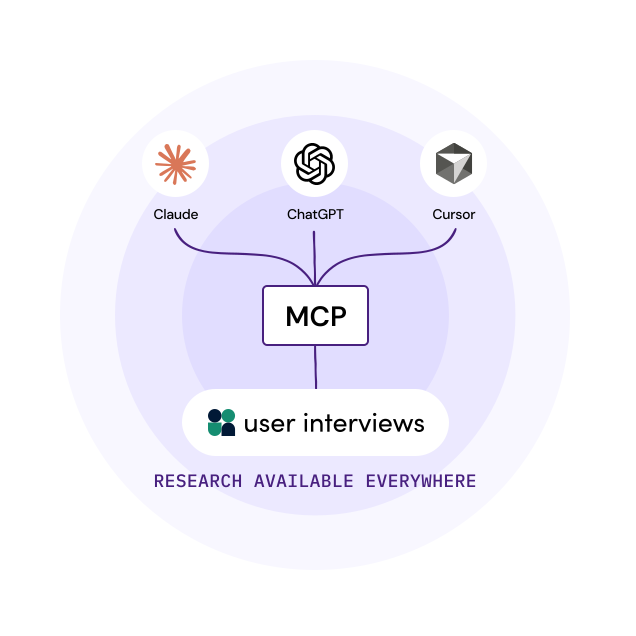
Diagram showing MCP connecting to Claude, ChatGPT, and Cursor, then linking to user interviews, with the text “RESEARCH AVAILABLE EVERYWHERE” below.
Why an MCP

What's an MCP, and why would I use one?

MCP (Model Context Protocol) is an open standard that lets AI tools like Claude, ChatGPT, and Cursor talk to external services.

When you connect User Interviews via MCP, your AI tool of choice can interact directly with our research assistant.

Research becomes available wherever questions come up: in the doc you're writing, the spec you're reviewing, or the chat where your team is already working.
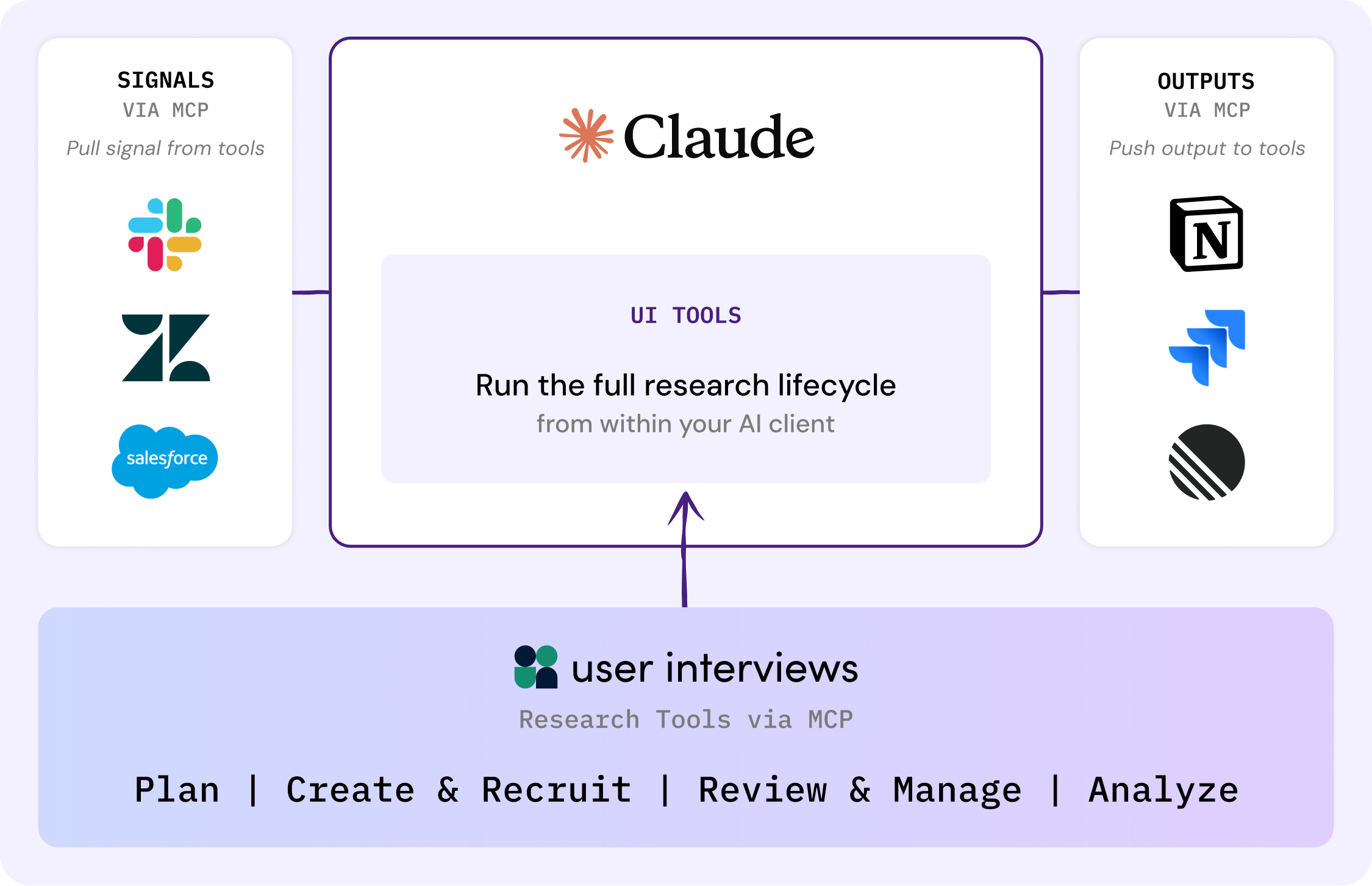
A flowchart shows Claude as a central UI tool for running the research lifecycle, connecting input signals from Slack, Zapier, and Salesforce to output tools Notion and Github, with user interviews and research steps listed below.
MCP Use Cases

What can I do with the User Interviews MCP?

A drawing of a notepad with a few scribbles on the paper and a pen writing on it.

Plan a study from wherever signal shows up

You don't need a polished PRD. Whether it's a support thread, a sales call note, or a half-formed idea in a doc, describe what you're seeing and the assistant helps shape it into a study — clarifying the question, suggesting an audience, and drafting a screener in the same conversation.
A large cursor arrow points at a rectangular window with wavy lines, above a small clock icon.

Recruit between meetings

Need a five-person usability study by end of day? Set audience, screener, and incentive in a single conversation, then let your AI tool monitor responses and surface qualified participants as they come in — so you can keep moving while recruiting runs in the background.
Two light blue horizontal rectangles with circles on the left, resembling server icons, are stacked. A white circle with a plus sign overlaps the bottom rectangle, suggesting an option to add more items.

Pull session data into your workflow

Bring transcripts, notes, and highlights into Claude, ChatGPT, or Cursor to synthesize themes, update a PRD, or draft tickets directly from what participants said. Quote real users in the artifacts you're already producing, instead of toggling between research and your editor.
A thick black circle with four pale blue outlined shapes evenly spaced around it: a circle, a diamond, a square, and a triangle. Each shape is outside the circle and partially overlaps its edge.

Stay in flow across the lifecycle

More coming soon
Plan studies, recruit participants, review sessions, and analyze findings from one surface — the AI tool you're already in. As more of the research lifecycle comes online via MCP, your workflow expands without adding new tabs, logins, or context switches.
Research lifecycle coverage
| Research Tools via MCP

Plan

Coming soon

Create & Recruit

Available

Review & Manage

Coming soon

Analyze

Coming soon
MCP Early Access

How to get access to the MCP

We're rolling out access carefully so every team gets a smooth setup. Here's what to expect:
Request MCP AccessA simple illustration of a smiling robot inside a purple circle, a large envelope above it, and a mouse cursor pointing toward the robot, with black arrows connecting the elements.
number 1 icon
Tell us about your team
Submit the request form with how you'd use MCP and what AI tools you work in.
2
We review your request
Our product team checks fit, AI tool compatibility, and IT readiness, then loops in your CS or sales contact.
3
30-minute intro call
We talk through your use case, answer questions, and confirm next steps.
4
Get set up
Approved teams receive credentials and setup instructions. If it's not the right time, we'll explain why and follow up when it is.
See it in action

Watch the User Interviews MCP at work

A quick walkthrough of launching a study, recruiting participants, and pulling session data into your AI tool — without leaving the conversation.

question mark icon

MCP FAQs

What is an MCP?

MCP (Model Context Protocol) is an open standard that lets AI tools like Claude, ChatGPT, and Cursor connect to external services like User Interviews. It's supported by all major AI platforms and is the most widely adopted protocol for this kind of integration. When you connect the User Interviews MCP, your AI tool can interact with our research assistant directly — launching studies, recruiting participants, and pulling session data into your workflow.

What tools does the User Interviews MCP work with?

The User Interviews MCP works with any AI tool that supports the Model Context Protocol, including Claude, ChatGPT, and Cursor. As more AI tools and IDEs adopt MCP, they'll be able to connect to User Interviews and run research workflows without any extra work on your side.

Do I still need to use the User Interviews app?

Every action you take via MCP is reflected in the User Interviews app. Today, some parts of the research workflow still live only in the app — project management, team settings, analysis tools. Over time, our goal is to give you the option to do as much as you want from the AI tool of your choice. The app will always be there when you need it.

How is the MCP different from the Hub API?

The User Interviews Hub API is a developer integration for syncing participant data between your internal systems and your User Interviews Hub — it's about keeping participant records in sync. The User Interviews MCP is an end-to-end research workflow for AI tools: instead of calling API endpoints, you're working with an AI research assistant that knows how to create projects, recruit participants, and surface session data on your behalf. Different problems, different tools.

What about security and privacy?

The MCP integration uses the same enterprise-grade security as the rest of the User Interviews platform: see our security page for details. Customer data is never used to train third-party AI models. Authentication is handled via OAuth, so access is governed by your organization's existing permissions.

Join the MCP waitlist

Get early access to the MCP

We're opening early access to select customers now. Tell us a bit about your team and how you'd like to use the User Interviews MCP, and we'll be in touch to set up a quick intro call.


Drawing of a laptop with a screen displaying a smiling robot and geometric shapes; two abstract human figures stand nearby, watching the screen.