
Who is this article for?
🗣️ All researchers (both admins and users)
⭐ Teams on any User Interviews plan
AI Recruitment
AI recruitment in User Interviews turns a simple natural language description of who you need for your study into ready-to-use targeting criteria and screener questions, cutting project setup time from hours to minutes.
✨To use these capabilities, first make sure AI features and auto-recording are enabled for your team.
AI recruitment is currently in BETA. Some recruitment criteria (location and skills) are not yet supported by this feature and will still need to be added manually in the Recruitment criteria section. Support will be added in an upcoming release.
How it works
- In your project draft, open the “✨Tell us who you’re looking for” drawer.
- Type in a description of who you’re looking to recruit.
- AI Assistant will recommend the exact criteria to apply to your study.
- It will also generate screener questions for criteria not covered.
- Keep chatting with AI Assistant to refine your criteria as you go.
- Click the button to add the settings to your draft project.
- You can review and/or edit these settings at any time before launch.
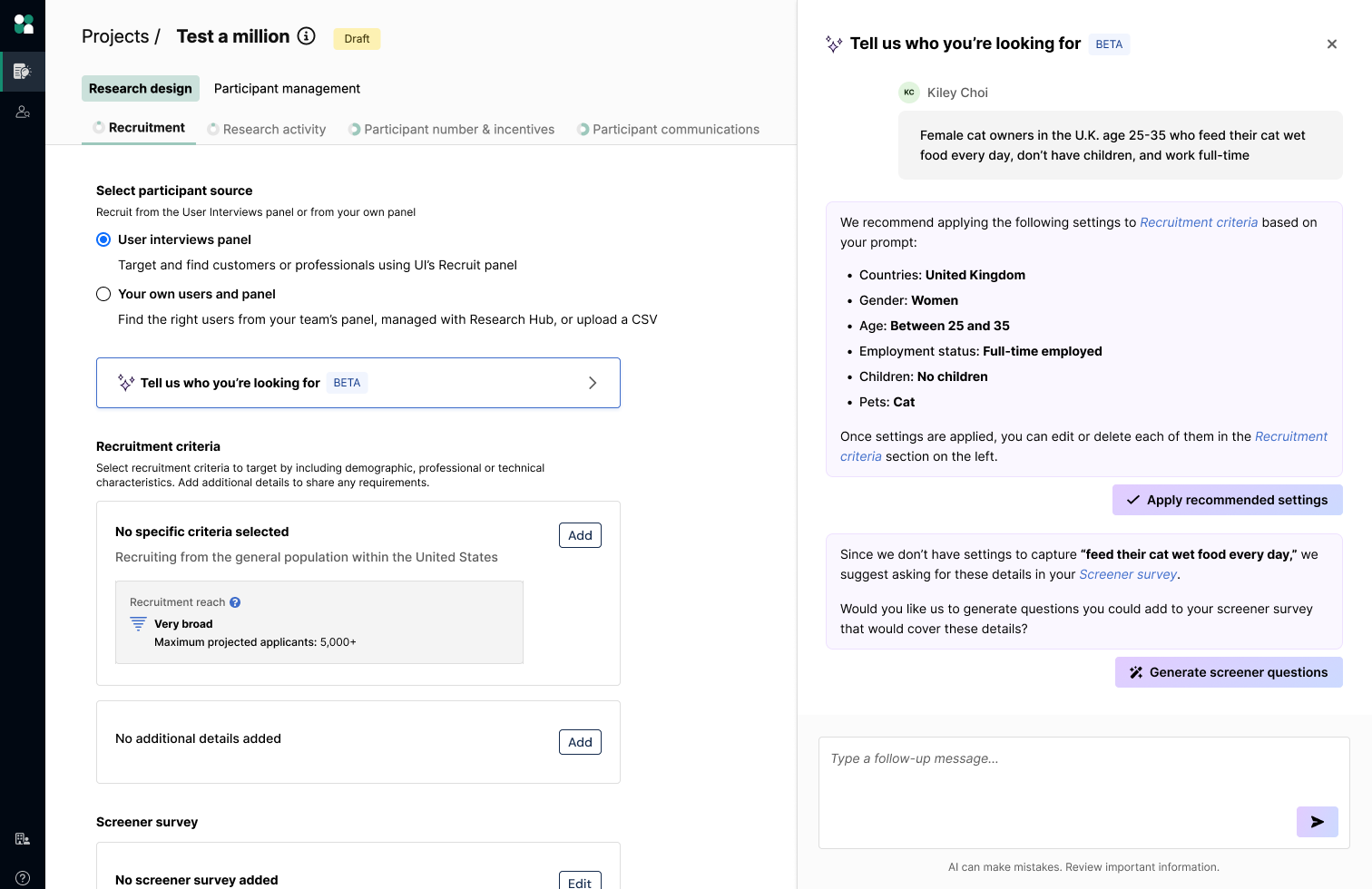
Prompt-based targeting
Assisted audience targeting helps newer researchers quickly navigate our wide range of available targeting options, surfacing relevant or more niche criteria that may apply to the project. Experienced researchers can jump straight to reviewing and refining before launch.
Smart screener generation
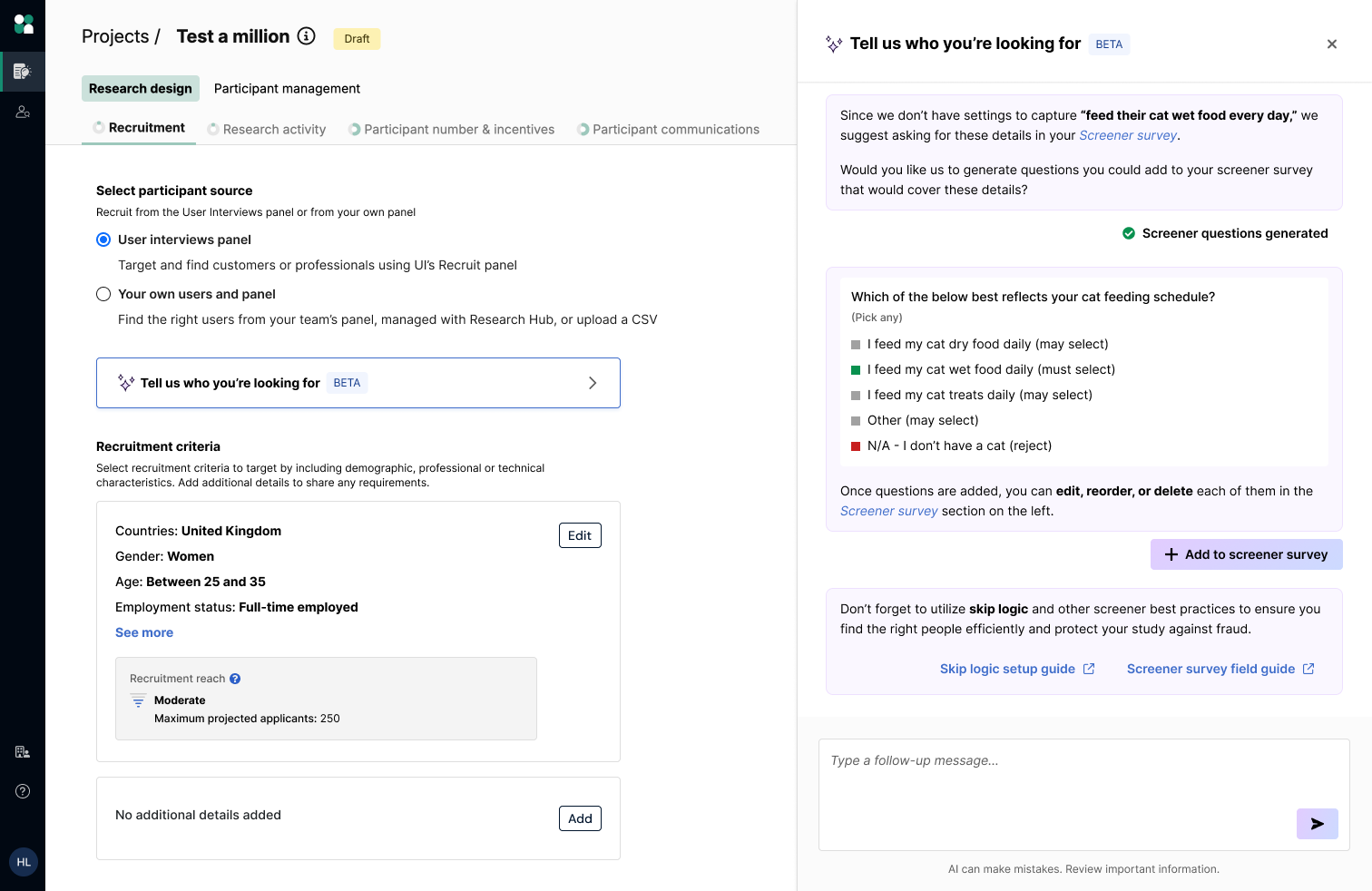
With smart screener generation, the system analyzes your recruitment requirements, considers screener best practices, writes your screener questions and answers, and sets up the appropriate qualification rules.
FAQ
Does AI recruitment replace manual criteria setup?
No, it’s an optional starting point, not a replacement for manual setup. You can use it to generate targeting criteria and screener questions, then review and edit them however you'd like—or skip it entirely and build your study manually.
How many job titles does AI recruitment support?
AI recruitment works across all job titles available in User Interviews. With roughly 70,000 titles in our system, you can describe who you're looking for in natural language and AI will suggest the most relevant options.
Can I refine the results if the first output isn't quite right?
Yes, just continue the conversation in chat with additional context or corrections, and our AI Assistant will update its suggestions accordingly.
Will AI recruitment change how User Interviews matches or invites participants?
No. AI recruitment helps you set up your targeting criteria and screener questions more efficiently, but it does not change how participant matching, targeting, or invitations work on the backend.
Does AI recruitment guarantee better screener quality?
AI recruitment is designed to help you get to a strong draft faster. It uses screener best practices to generate suggested questions and aims to avoid leading language, but it may still make mistakes. We recommend reviewing everything before launching your study.
Does AI recruitment work if my organization has AI features turned off?
No. AI recruitment (and all other AI features) is only available if AI features have been enabled for your organization. Access is fully controlled by your admin, and these settings are never turned on automatically.
Can participants still apply to my study if they don't match my AI-defined criteria?
Yes. Criteria created through AI recruitment behave the same way as criteria set manually. They help target and match the right participants, but they are not hard application gates on their own.