



Finding enough qualified participants to complete a survey is a primary challenge for researchers—and for good reason.
Low response rates are one of the most frustrating challenges in research. In fact, our State of User Research 2024 report found that 57% of researchers struggle with participant reliability and quality—a problem that low response rates only make worse.
Getting people to open, engage with, and complete your survey isn’t as simple as sending it out and hoping for the best. And when you spend the time recruiting survey participants, only for them to ignore your invites or skip out on the survey entirely, you end up wasting your research budget.
After supporting thousands of researchers and distributing millions of survey invitations, we’ve identified four common mistakes that lead to low response rates:
- Poor targeting: If your survey reaches people who aren’t a good fit—whether due to demographics, behaviors, or interests—it’s unlikely they’ll respond, leading to low completion rates and unusable data.
- Uninspiring invites: If your email lacks a clear purpose, feels impersonal, or looks like spam, recipients won’t even open it, let alone sign up for and complete your survey.
- Weak incentives: When participants don’t immediately see the value of participating, they're far less likely to engage with your study. This is true for incentives that aren’t valuable enough or don’t clearly communicate the reward.
- Logistical friction: When invites get lost or there’s friction in the process, even interested participants can drop off.
Don’t let low response rates stall your research. Book a User Interviews demo and streamline recruitment from start to finish.
In this guide, we’ll walk through research-backed strategies for increasing survey response rates, based on our discoveries through years of building and maintaining a panel of 6 million participants.
But first, let’s start with one of the most common questions when it comes to running surveys: What's a good survey response rate anyway?
What's considered a good survey response rate?
A survey response rate is the percentage of people who complete your survey out of the total number of people you invited. It can be calculated by dividing the number of completed surveys by the total number of surveys sent.
It’s among the most important indicators of whether your outreach strategy is working and whether your audience finds the survey relevant and worth their time.
The truth is, there’s no single “good” survey response rate. It depends heavily on your audience, distribution method, and type of study. That said, there are reliable benchmarks you can use to gauge whether you’re underperforming or on track.
Based on our experience and some data from SurveySparrow’s Survey Response Rate Benchmarks Report, these are considered good response rates (based on survey type):
- Customer feedback (email): 10–30%
- UX/product research (cold panel): 5–15%
- Internal employee surveys: 60–85%
- In-app or website pop-up surveys: 20–30%
- Panel-based recruitment (vetted): 40–70%+
If you’re seeing rates below these ranges, it might be a sign that something’s off with your targeting, timing, messaging, or incentive.
For example, if you’re running a customer feedback survey and getting under 10% response, that could mean your emails aren’t getting opened, your ask isn’t clear, or your audience simply doesn’t see the value in responding.
While a high-quality panel like User Interviews is a major lever, your own survey design also plays a critical role.
5 ways to increase survey response rates
Remember, a high response rate doesn’t matter if survey data quality is low. Every strategy we discuss below is focused on improving both response quantity and participant fit—so you're not just getting more data, you're getting the right data.
1. Consider panel quality to ensure you’re targeting the right audience
Poor targeting is one of the most common reasons for low survey response rates. If your invites go to people who aren’t interested, don’t qualify, or don’t trust you as a source, you’ll see low engagement, even with high-quality survey design and strong incentives.
Most research teams face this issue as they either rely on outdated contact lists, recruit participants from third-party panels with minimal oversight, or post open calls on social media, hoping the right individuals will respond.
While it is possible to find some success through these channels, particularly via email, they tend to waste time and typically attract irrelevant or low-quality respondents who aren’t motivated to participate (or complete the survey).
It's also possible to use generic survey platforms to potentially reach your target audience. However, these platforms provide broad access to participants, and their panel quality is often weak because they rarely enforce strict fraud prevention measures.
That means many respondents end up being bots or individuals who exaggerate their qualifications. This leads to response drop-off, unusable data, and wasted incentive spend. Or worse, you end up over-recruiting the same people, which can lead to survey fatigue.
User Interviews addresses these issues by providing you with direct access to a vetted panel of 6 million high-quality participants. Our panel is proprietary and built 100% in-house with no third-party sourcing.
The platform uses a matching algorithm trained on 20M+ data points to identify the best-fit participants for your study, with fraud rates below 0.9%.
Using Recruit, you can filter based on pre-defined criteria to ensure you're reaching people who not only qualify but are likely to respond and engage. Adjustable criteria include:
- Demographics and lifestyle signals: Set filters like age range, gender, household income, education level, and parental status.
- Professional characteristics: Find respondents based on job title, seniority, industry, or years of experience (ideal for B2B or product research).
- Device and tech usage: Define whether you need Android users, iOS beta testers, or people familiar with a specific app or platform.
- Geographic targeting: Identify individuals in specific countries, regions, cities, or even zip codes when your survey requires local context.
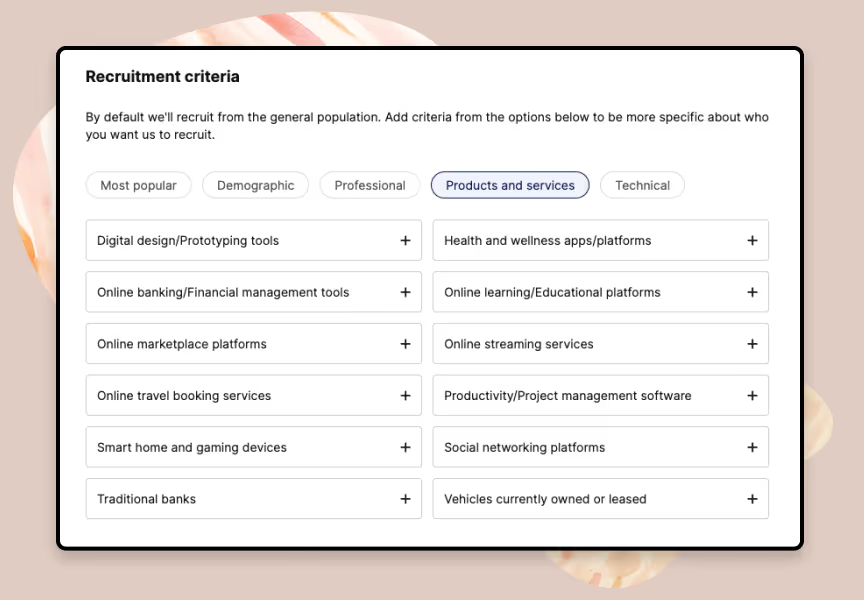
Most survey platforms don’t offer this level of precision when looking for potential survey participants. This screening drastically reduces irrelevant outreach, increases the odds that people will actually respond, and improves your overall data quality.
2. Create custom screener surveys to avoid unqualified survey respondents
Screener surveys are another proven method that successful researchers use to increase response rates. They act as a front-end filter, ensuring that only qualified and relevant participants reach your actual survey.
We analyzed over 42,000 screeners to discover the best practices that consistently lead to higher response rates, better participant fit, and stronger data quality.
Here’s what we found:
- Ask neutral, non-leading questions: Instead of asking “Do you use our product?” ask “Which of the following tools do you currently use?” This reduces the chance of participants gaming the system just to qualify.
- Avoid binary questions: Yes/no answers, such as “Do you use Netflix?” are easy to fake and tend to hint to the participant what the right answer is. Use multiple-choice survey questions instead to gather more reliable data.
- Use open-ended questions strategically: A short question like “Tell us about the last time you used a mobile app for productivity” helps identify thoughtful, articulate participants—and filters out low-effort responders who are likely to rush through your actual survey.
- Apply skip logic to qualify or disqualify automatically: For example, if someone selects “Android” in a device question, they’re automatically excluded from iOS-specific questions.
User Interviews makes it easy to build high-performing screeners using a flexible drag-and-drop editor. You can choose from a variety of question types, including multiple choice, pick-one, short answer, long answer, or even video response, to match your study requirements.
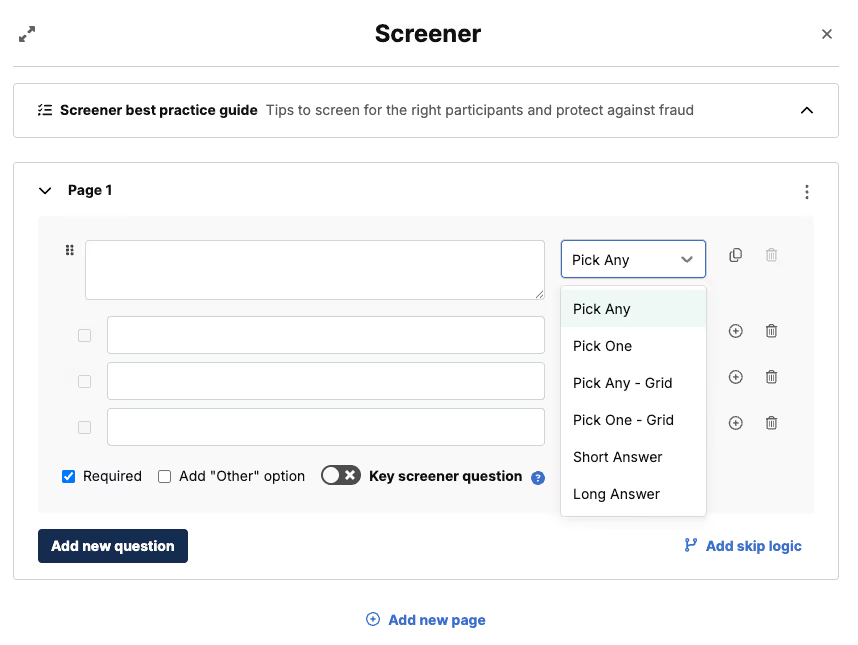
Not only does our software offer plenty of customizations, but it also streamlines the process. You can bulk paste answer choices when creating multiple-choice questions and save screener survey templates for future reuse, eliminating the need to start from scratch every time.
If you're running multiple studies or working across teams, this makes it fast to standardize screeners and iterate on what works, especially when you're testing similar audiences across different surveys.
For more advanced needs, User Interviews also offers Premium Screening (also known as double-screening). This premium option allows you to manually vet participants who pass your screener before approving them for your actual survey.
You can:
- Request additional details via email or phone.
- Prompt participants to submit a 90-second video response to a custom question.
- Match participant responses against your own internal database for added verification.
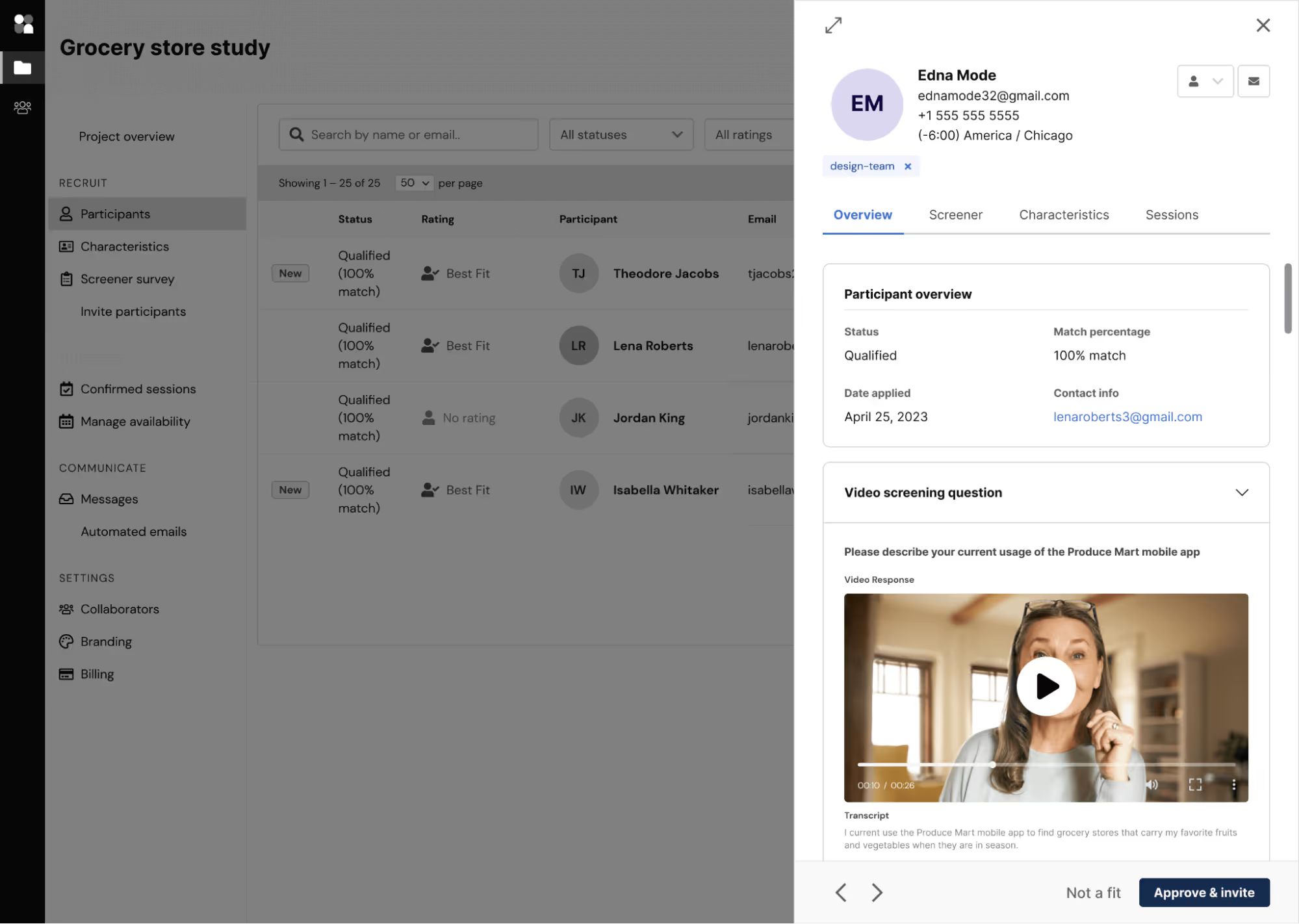
The system also detects and prevents fraud by identifying when participants copy and paste screener responses. It will also flag their recent activity if it looks suspicious.
These additional verification steps typically lower screener drop-offs and increase survey response rates.
3. Offer incentives that actually entice participants
A worthwhile incentive is key to improving response rates and screener completion rates. Offering a reward that matches the effort required reduces drop-off and encourages high-quality survey participants and responses.
Low-effort incentives tend to attract low-effort respondents. You end up with rushed answers, incomplete surveys, or participants who are just in it for the gift card. Worse, slow payments damage trust and reduce the likelihood that someone will ever participate again.
To get high-quality, reliable responses, you need to:
- Offer a fair incentive that matches the time/effort required
- Communicate it clearly in the invite or screener
- Deliver it fast—ideally, automatically
This isn't just guesswork. We actually conducted a study to determine which incentives yield the best results for various research studies, including unmoderated surveys. All of our findings are available in our research incentives report, which analyzes data from 20,000 completed projects.
Here’s what we found out about incentives and their impact on study results:
- For unmoderated studies (including online surveys), the average incentive for B2B studies ranged from $80 to $100 per hour (or $1.30–$1.60/min) and from $50 to $80 per hour (or $0.83–$1.30/min) for B2C studies.
- Higher incentives mean better response rates. B2B studies offering $110 per hour (or $1.80/min) had the lowest no-show rate of 2.3%. Similarly, B2C studies offering $160 per hour (or $2.60/min) had a much lower no-show rate of 8.2%
- Meanwhile, for both B2B and B2C studies, an incentive of $60 per hour or $1 per minute resulted in a significantly higher no-show rate of nearly 30%.
Below, we’ve included our incentive recommendations for unmoderated B2B and B2C studies, categorized by study length:
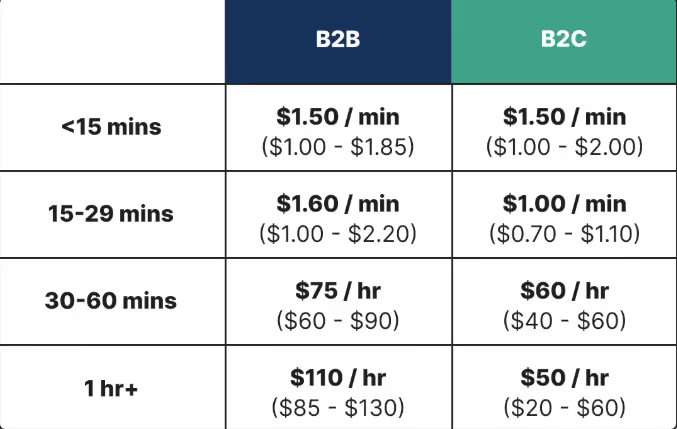
If you’re not sure what to offer participants for your survey studies, check out our UX research incentives cheat sheet or figure it out on your own with our User Research Incentive Calculator.
User Interviews simplifies the process of calculating, creating, and distributing rewards with built-in incentive tools. You can set up, manage, and distribute rewards directly from your dashboard, eliminating the need to switch between third-party tools or payment platforms.
You're able to choose from 1,000+ incentive types, including Amazon gift cards, cash, or donations. They're available in 200+ countries and support multiple currencies, including USD, EUR, AUD, CAD, and GBP for Recruit projects.
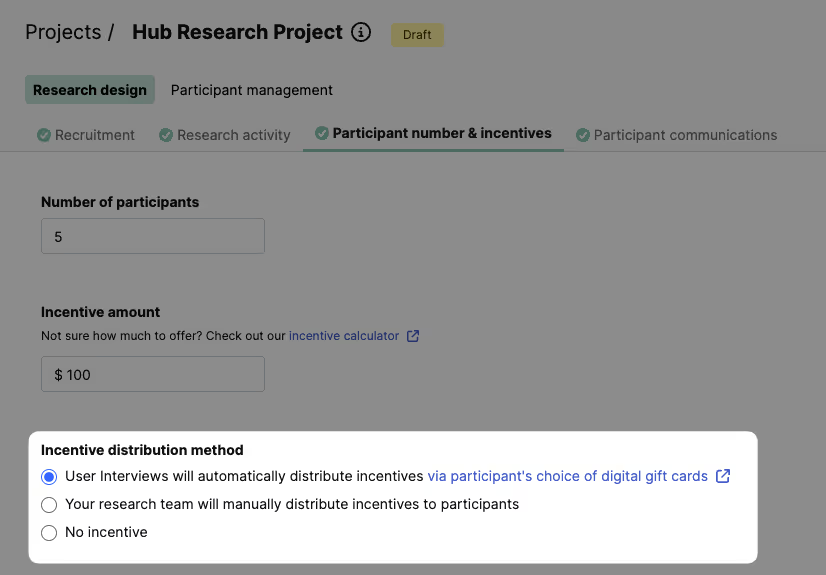
As soon as the participant completes the study, rewards can be sent automatically, helping you keep participants happy and engaged. You can also adjust incentive amounts mid-project if you need to boost participation or increase quality, without restarting the entire campaign.
4. Streamline logistics and automate follow-ups
A frustratingly low response rate isn’t always due to targeting or incentives; it’s often caused by logistical friction. When invite emails get lost in spam folders, links are broken, or communications are inconsistent, even the most interested participants can drop off.
Manually tracking everything in spreadsheets and inboxes is time-consuming and prone to error. Centralizing your workflow is a critical lever for increasing response rates.
User Interviews helps you manage the logistics of survey distribution. You can:
- Manage all participant communication: Use customizable email templates to send invites and other project communications directly from the platform. This keeps all your messaging in one place and ensures a professional, consistent experience for participants.
- Manage your project centrally: Keep your project organized by managing participants and incentive distribution from a single platform. This eliminates the need to constantly cross-reference spreadsheets and email chains to see who has been paid.
- Handle payouts automatically: As covered in the incentives section, automating payouts with User Interviews ensures participants are rewarded promptly upon completing, which builds trust and goodwill for future research.
By removing manual friction, you make the process seamless for both you and your participants, ensuring more people complete the survey. Plus, they’re more willing to participate in future surveys.
5. Write effective survey invite emails
Even with the right audience and a fair incentive, your survey response rate will underperform if the invitation itself falls flat. Highly qualified participants will ignore an email if the subject line is bland, the value isn’t clear, or the tone feels robotic.
At User Interviews, we’ve seen the impact firsthand. We send over 2 million research recruiting emails every month, and our customers send an additional 150,000.
After recruiting millions of participants via email, we’ve identified exactly what works—and what doesn’t—when it comes to maximizing survey response rates.
Here are some best practices we've discovered while doing so:
- Segment your list: Don’t blast the wrong people. Proper targeting is the foundation of a successful email.
- Use a trusted sender: An email from a generic address feels like spam. Use an address that builds trust, like research@yourcompany.com.
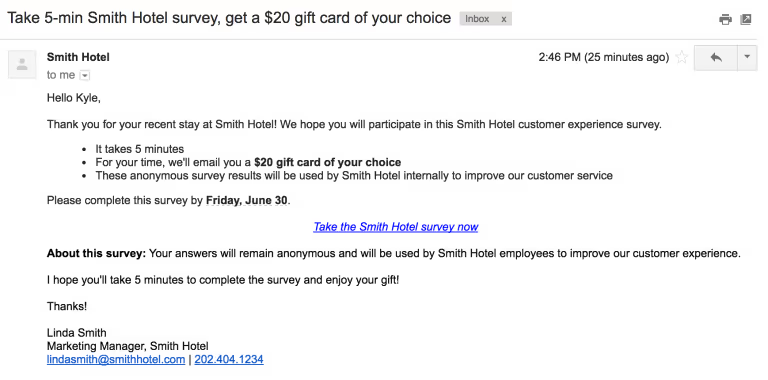
- Start with a clear and enticing subject line: Make a strong first impression with concise language and clear figures. Let them know what they’ll get out of it. For example, a well-performing subject line for research invite emails can be something like “Take a 5-minute survey for a $30 Amazon gift card.”
- Write like a human: Avoid corporate jargon and robotic phrasing. A clear, approachable tone makes participants more likely to engage.
- State the key details clearly: Your email body should quickly answer:
- The incentive: Highlight the reward upfront. Don’t bury it.
- The topic and the time commitment: What is the survey about and how long will it take?
- The call to action (CTA): Use clear, direct language. “Take the 5-minute survey now” is much stronger than “Click here to learn more.”
- Follow up, don’t spam: It’s fine to send reminders, but give it a couple of days. No one likes a crowded inbox.
Increase your research survey response rates with User Interviews
Boosting survey response rates starts with better targeting, thoughtful invites, and refined screening. The strategies in this guide are proven to help you get more responses and better survey results.
User Interviews makes the entire process easier with built-in tools for recruiting, screening, and managing incentives—all in one platform.
Want to improve your survey response rates and gather better research data? Book a demo with User Interviews to see how you can optimize your research process.