



Surveys are one of the most popular UX research methods because they're affordable, scalable, and ideal for collecting quantitative data. Modern survey tools like SurveyMonkey, Typeform, or Google Forms make it easy to build surveys and share links across channels— but distributing your survey effectively is the real challenge.
According to the 2025 State of User Research report,
- 61% of researchers struggle to find enough participants
- 54% struggle with sourcing high quality respondents
Simply posting your survey link across distribution channels might boost quantity, but it often hurts quality by bringing in the wrong audience.
At User Interviews, we’ve helped thousands of researchers distribute surveys to right people through our panel of 6 million participants. Below, we share what we’ve learned about effective survey distribution and how to balance reach, cost, quality, and reliability.
Schedule a demo today to find out how to optimize your survey distribution with User Interviews.
3 steps to choose the right survey distribution method
Step 1: Define your target audience
Start by clarifying who you want responses from:
- General population or niche users?
- Existing customers or new audiences?
If targeting matters, use screeners to qualify respondents based on clear criteria like:
- Demographics (age, gender)
- Behaviors (new vs. returning users)
- Platform preferences (mobile vs. desktop)
Screeners prevent skewed or fraudulent data by filtering out unqualified, over-surveyed, or AI-generated participants. Use attention checks to catch inconsistencies and improve data validity.
Step 2: Go where your audience is
Match your distribution channel to where your chosen users spend time. For instance, send targeted emails to more loyal customers, or use social media platforms to engage niche communities relevant to your research.
To stay organized, we recommend creating unique links per channel, appending basic identifiers (like campaign, cohort, etc.) to track performance, prevent duplicate responses, and manage quotas for target audience segments.
Step 3: Test before scaling
Before a full rollout, run a soft launch to confirm that your targeting, messaging, and timing are working.
Track channel metrics like:
- Response rate
- Incident rate (percentage of eligible participants)
- Completion rate
Testing early helps refine your plan, avoid missed deadlines, and ensure balanced data quality.
The top 5 survey distribution methods
Below, we'll break down common methods to find survey participants and distribute surveys—from user panels to email and social media—what each is, when it works, and where it falls short.
1. User research panels
Best for: Reaching qualified, verified participants outside your existing audience
What it is: User research panels (also commonly known as survey panels or participant recruitment platforms) are specialized databases of pre-vetted individuals who have opted into research studies. These platforms allow researchers to target specific respondents based on criteria such as demographics, behaviors, or professional roles. With this level of advanced targeting, research teams can distribute surveys to the most relevant audience and ensure their data is primed for generating valuable insights.
Why it works: Panels minimize the biggest pain points in survey distribution—low engagement, sourcing high quality respondents, and fraud—by ensuring every participant meets your predefined criteria.
User Interviews’ Recruit tool is a leading participant recruitment platform, providing access to a proprietary database of 6 million verified participants, built in-house without third-party sourcing. With User Interviews, you qualify respondents before they ever see your online survey link, so distribution goes to the right people from the start.
The panel maintains a fraud rate below 0.6% through 50+ verification signals, including identity checks, device fingerprinting, and social media profile syncing. Researchers can also review participant histories, ratings, and notes to ensure reliability and avoid no-shows.
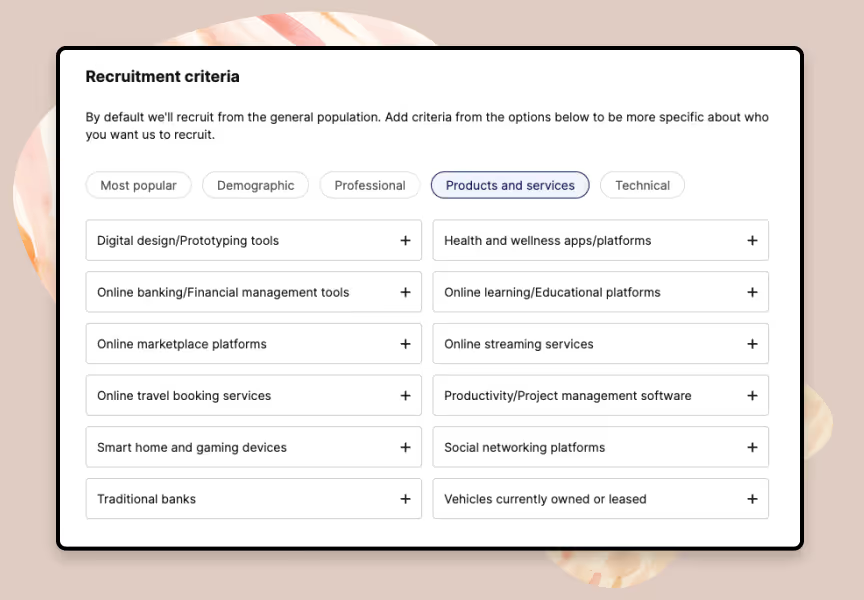
With 20+ targeting filters, Recruit starts matching participants in 24–48 hours across:
- Demographics: Age, gender, income, education, ethnicity.
- Professional: Job title, industry, seniority, company size.
- Products & Services: Software, subscriptions, financial platforms.
- Technical: Devices, operating systems, app familiarity.
- Geographic: Countries, cities, regions.
For example, a UX team looking to gather insights on e-commerce behavior can target “online shoppers who purchased clothing in the last 30 days."
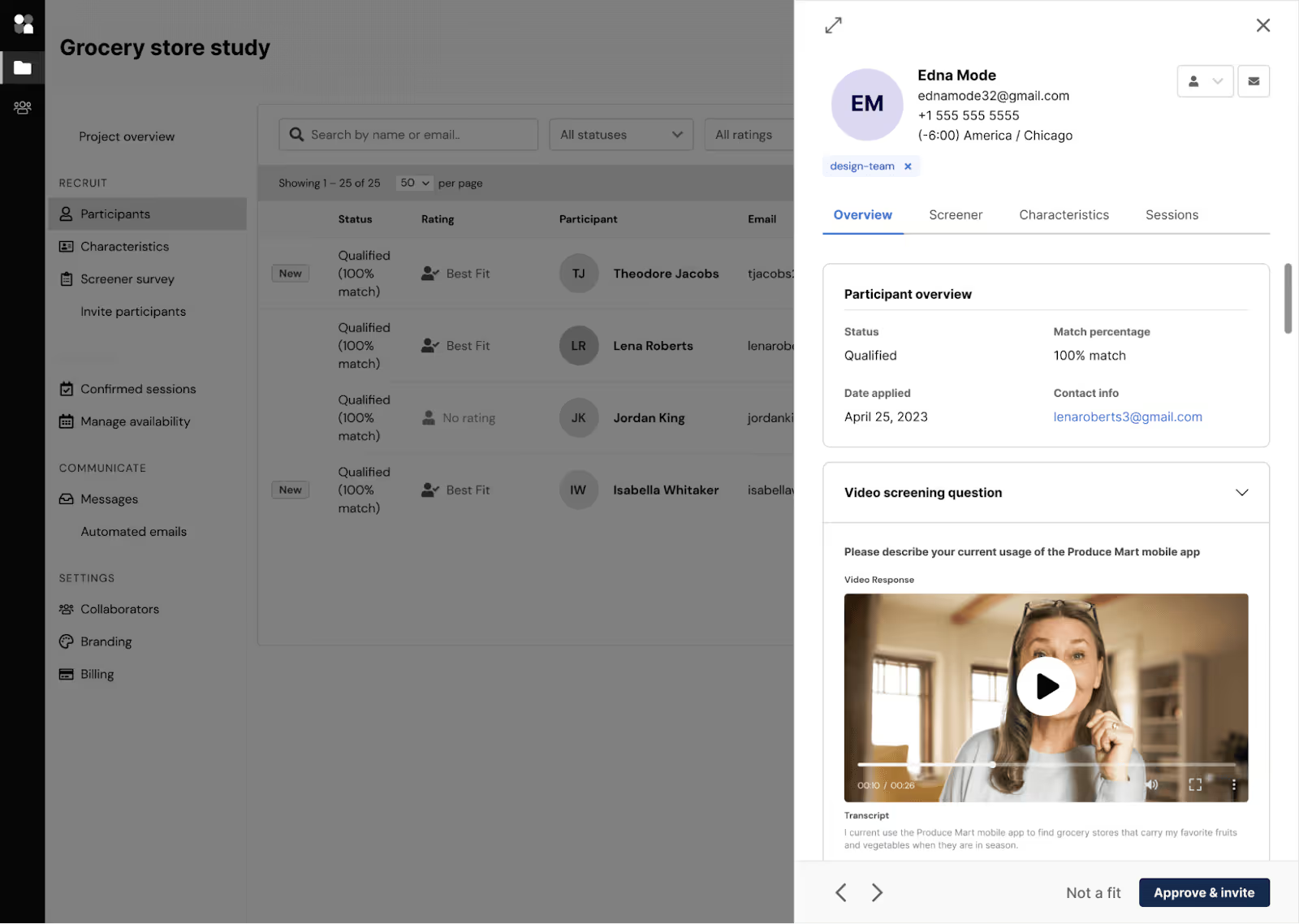
The platform includes customizable screeners with various question types, including:
- Pick-one
- Pick-any
- Multi-select
- Grid (matrix)
- Open-ended question fields for short and long answers
You can also bulk-paste long survey questions and answers and save screeners as reusable templates.
For more advanced screening, consider using the following features:
- Premium Screening for double verification via email, phone, or short follow-up.
- Automatic Qualification to instantly approve 100% matches.
- Skip logic to route, qualify, or disqualify participants based on previous answers.
2. Email to owned lists
Best for: Researching current customers, subscribers, or known users.
What it is: Email distribution leverages your CRM, marketing platform, or survey tool to reach an audience you already know—customers, newsletter subscribers, or beta testers.
Why it works: This fast, free method is also tightly aligned with business goals. You can segment by tier, behavior, lifecycle stage, or geography.
According to our State of User Research 2025 data, email is currently the most popular recruiting method, with 58% of all researchers using it to recruit audiences. 63% of researchers who want to recruit current customers use email, while 54% of those working with external participants employ the same method.
Use email when you want feedback from known users, need quick reactions to recent changes, or plan to recontact the same cohort later. Emails are especially effective for post-purchase, post-support, and feature-validation surveys, when the interaction is still fresh in customers’ minds.
To ensure the best results with email, prioritize fit over reach. Broadcast-style sends can inflate sampling bias and accelerate list fatigue. In that vein, also make sure you’re sending engaging invitations and incentives with clear purposes, time estimates, and good rewards to ensure high response and completion rates.
3. In-product or in-app intercepts
Best for: Collecting in-the-moment feedback from active users.
What it is: In-product (or in-app) intercepts are prompts shown inside your product (banners, modals, slide-ins, or toasts) that invite users to take a survey immediately after a meaningful action (e.g., completing a task, encountering an error, using a new feature).
A dedicated tool with intercepts typically provides numerous customization options, enabling you to collect data that aligns with your research goals. Typical features include event-based targeting (show after a task or error), simple UI prompts (banner, modal, slide-in), rate limiting, and basic reporting on views and completes.
Why it works: You catch users in context, yielding relevant feedback with minimal friction. However, intercepts reach only active users and can interrupt workflows if not timed carefully.
To ensure best results with intercepts, use event-based triggers, keep surveys short (1-3 minutes), and limit frequency to avoid fatigue.
4. Social media platforms and online communities
Best for: Fast reach or niche, hard-to-find audiences
What it is: Distributing surveys via LinkedIn, Facebook, Instagram, and Reddit, or niche communities (Slack, Discord, forums) either organically (posting) or via targeted ads. Researchers use target ads, especially on Meta-owned platforms, for recruiting hard-to-reach populations, because you can filter by defined attributes (location, interests, job titles).
Why it works: Many research teams prefer social media because it’s a cost-efficient acquisition method. You can broaden geographic reach, surface participants you don’t already have in your CRM, and recruit new participants at scale.
However, it also presents some drawbacks. For instance, samples are typically prone to self-selection bias and uneven representation. Additionally, it’s challenging to verify whether individuals are genuine or if they're duplicates and/or bots. This can cause inaccurate survey results.
Some contexts also limit how you recruit or send surveys. For example, if you use Reddit, many subreddits allow survey links only under strict conditions, while others ban study recruitment entirely.
To ensure best results with organic posts on social media, review the platform and community rules (especially on Reddit, where each subreddit has its own specific policy) and tailor your invitation accordingly. For paid ads, start with small pilots, monitor incidence rate (IR), cost-per-click (CPC), and audience quality, then scale what works. For both instances, be sure to align with internet research ethics on informed consent, data privacy, and participant data protections.
5. Market research agencies
Best for: Large-scale, regulated, or multi-country studies
What it is: Market research agencies are full-service partners that handle recruitment end-to-end, including defining audience criteria, identifying niche populations, conducting multi-step screening (online and phone), managing scheduling and reminders, and coordinating incentives.
Why it works: Many market research agencies also tackle complex logistics, such as multi-country fieldwork, translation, NDAs, and compliance for regulated groups (such as healthcare), which makes them a strong option for high-stakes or highly specialized studies.
While agencies can potentially deliver reliable respondents, they often carry significant costs and take at least two weeks to deliver qualified participants. In many cases, it can take up to 3-5 weeks for an agency to build a viable pool. Qualitative research projects frequently span 6–10 weeks from kickoff to final report.
Check out our cost savings calculator to find out how much you could save by using User Interviews instead of a research recruitment agency.
It's also difficult to change your recruiting. For instance, if project scope changes (such as new quotes or an increased sample size), any agency will include a new fee and a later delivery date. You’ll also have less day-to-day control on screening and scheduling, so it’s harder to iterate on targeting or tweak your survey.
No matter your distribution method, think about participant management
Even the best survey distribution plans can fall apart without the right participant management. After fielding surveys, researchers often run into two major challenges:
- Manual workflows—Handling screening, invite rules, and incentive fulfillment manually slows teams down and increases errors.
- Compliance and trust issues—overlooking consent, opt-outs, and frequency caps can damage participant trust and survey deliverability.
Integrating your survey tool with Research Hub solves these problems. Hub centralizes participant management—covering consent, invite rules, quotas, recontact settings, and automated incentives—all in one governed database. It integrates with over 20 leading survey tools, including Qualtrics, SurveyMonkey, and Typeform.
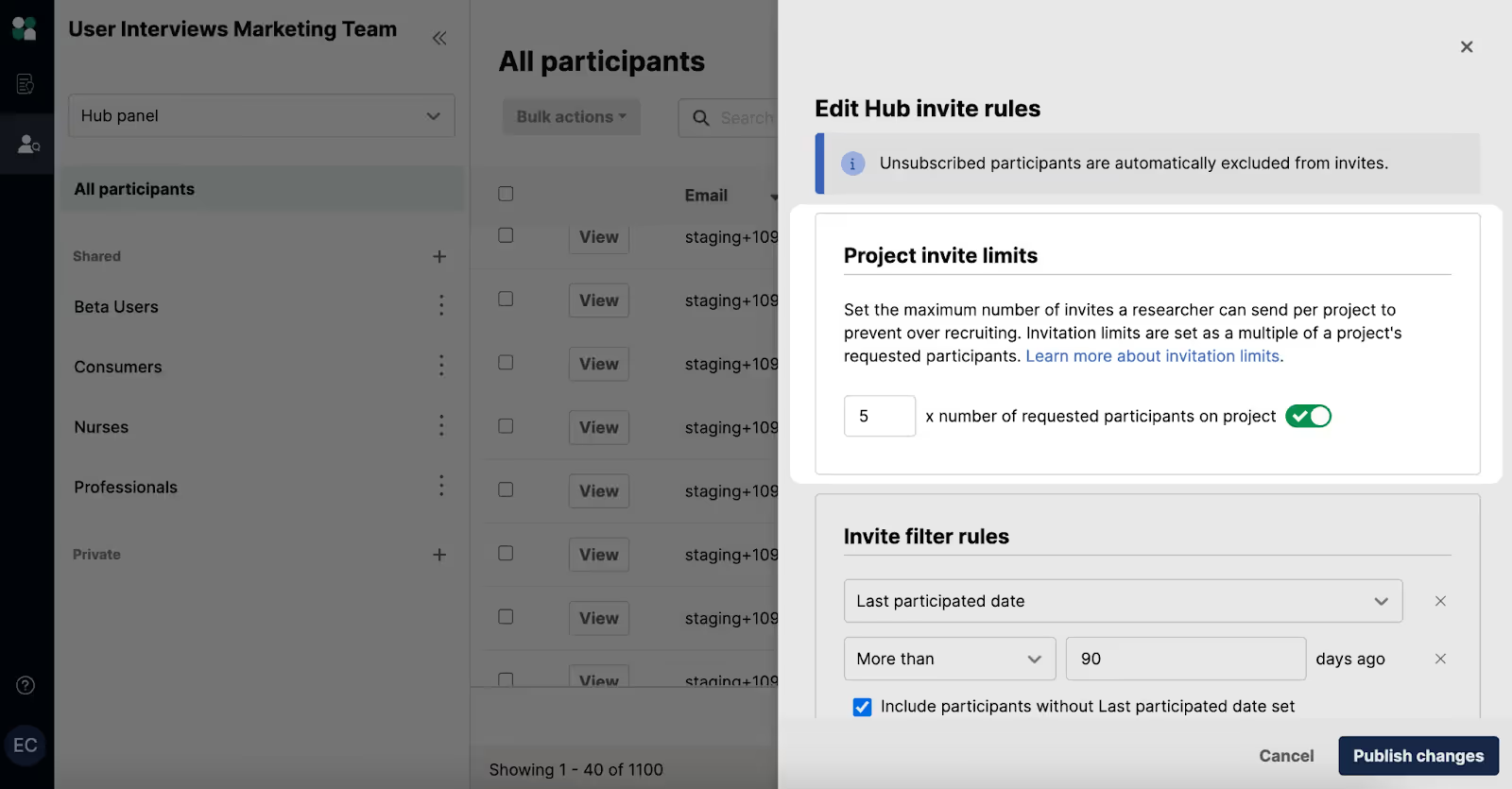
In Research Hub, you can import contacts from your CRM or a CSV, then enrich each profile with the fields that matter most (e.g., product usage, region, device, and signup date).
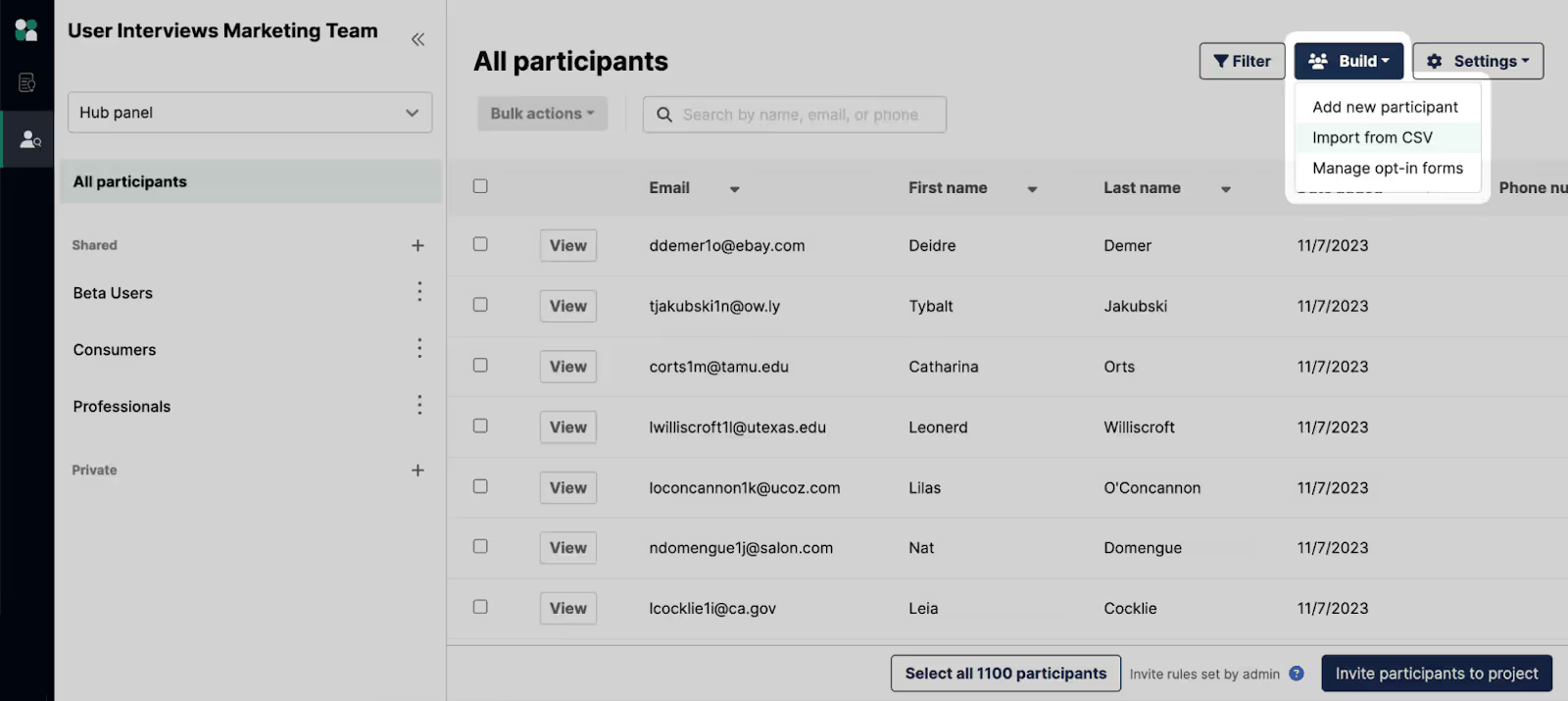
Hub also helps you stay compliant with data protection regulations (e.g., GDPR, CCPA) by providing clear opt-out options, transparent data usage policies, and frequency caps to avoid over-surveying. Consent status, privacy flags, participant history, and incentive history are visible in one searchable system—replacing the chaos of ad-hoc lists.
From there, you can define dynamic cohorts such as:
- “Pro plan users, signed up in the last 90 days”
- “Beta participants on iOS”
- “Churned customers in EMEA”
Cohorts are updated as data changes, so you don’t have to rebuild targeting for every survey. Hub also tracks eligibility and invite history, you can instantly see who’s new, who’s over-contacted, and who should be excluded.
Next, qualify before you invite. Build a screener in Hub to confirm a participant fit (role, behaviors, thresholds) and automatically route eligible individuals to your survey link.
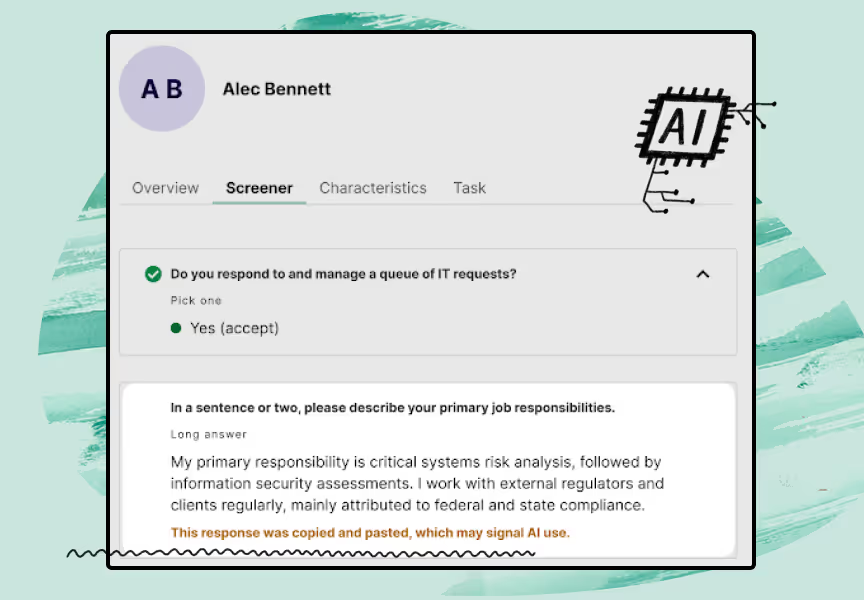
As new survey responses come in, Hub keeps everything organized—and even handles automated incentive distribution.
With User Interviews, incentives are built into your workflow. Research teams can choose from 1,000+ reward types (digital gift cards, cash, charitable donations) available in 200+ countries. We support major currencies (including USD, EUR, GBP, CAD, AUD, and more).
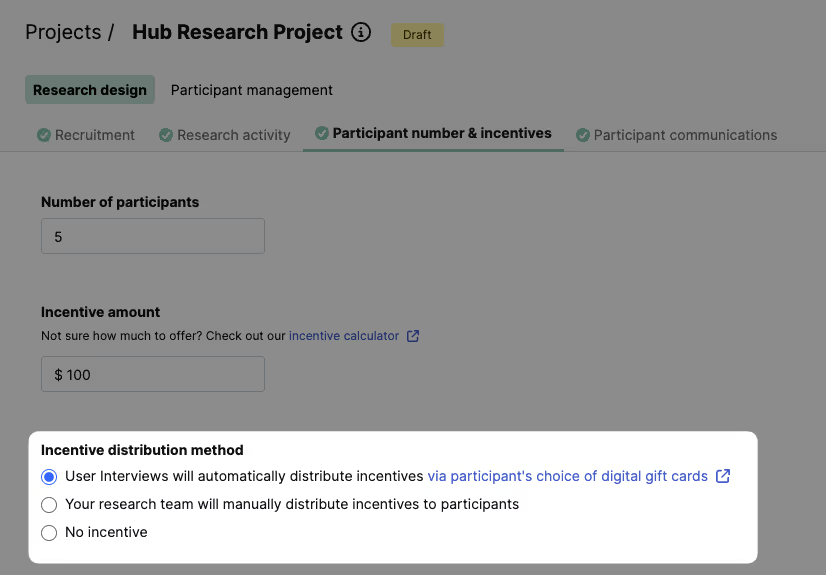
Incentives can be delivered automatically upon verified completion or approved manually.
You can also adjust in case you need to increase your quota or attract additional respondents. Also, if you reward participants swiftly after completing a survey, they'll be more likely to engage with future surveys.
Ready to learn how to increase survey response rates and collect better data from the right participants? Book a demo with User Interviews today.