



This article outlines a four-step framework for participant management in qualitative research—recruitment, panel building, management, and engagement. It highlights best practices like targeted screening, centralized data, and automated scheduling and incentives. Comparing spreadsheets, CRMs, and purpose-built tools, it shows how dedicated research platforms streamline workflows and improve participant experience.
Participant management is the process of organizing, communicating with, and tracking research participants. It covers everything from recruitment and screening to scheduling, reminders, incentives, and maintaining participant records for future studies.
While it might seem like a straightforward process, managing participants for qualitative research can be difficult — our 2024 State of User Research report shows that 62% of researchers struggle to find enough participants who match their criteria, while 31% have issues with scheduling sessions.
In our experience of building and managing a research panel of 6 million participants, researchers typically face these same issues because they:
- Recruit without clear targeting, attracting participants who can’t meaningfully answer the research question, and wasting budget on irrelevant responses.
- Store participant data across scattered tools (like spreadsheets and generic CRMs), making it hard to track contact details, consent, study history, and incentive totals.
- Rely on manual scheduling across email chains, slowing down recruitment and increasing the risk of double-booking or no-shows.
- Communicate inconsistently and delay incentives, which hurts trust with participants and reduces their willingness to join future studies.
In this guide, we’ll share the most important participant management best practices to avoid these mistakes based on our experience. You’ll also explore three common approaches to participant management — including features and real-life examples from our own participant management software, User Interviews.
Book a demo with User Interviews today to learn how to manage your participants more efficiently.
4 participant management steps (& best practices for each one)
Every successful participant management project moves through the same four stages — from initial outreach to building long-term relationships.
At User Interviews, we follow proven best practices for each step to keep participants organized, engaged, and ready to share valuable insights.
- Recruitment: Find the right participants with precise targeting and screening.
- Panel building: Continuously grow and refresh your participant pool.
- Panel management: Keep participant data accurate and organized.
- Engagement and incentives: Communicate clearly and deliver incentives promptly.
Below, we’ll walk through each step along with the best practices that make them work in real-world research.
1. Recruitment: find the right participants with precise targeting and screening
The participant management process starts with recruitment and targeting the right people for your study. This is how you ensure you’re only gathering data from an audience that matches your research objectives.
Many teams skip this step or define their audience too broadly (e.g., “mobile app users”) instead of targeting people who can meaningfully answer the research question. Without clear criteria, you end up with participants who don’t match your needs, leading to irrelevant feedback, higher no-show rates, and a wasted research budget.
Instead, define who you need based on clear criteria, such as specific demographics, professional background, behaviors, psychographics, and other traits that directly relate to your research goals.
Effective targeting combines multiple criteria, such as:
- Psychographics: Attitudes, preferences, or values (e.g., prefers vegan foods)
- Behaviors: Habits or usage patterns (e.g., commutes to the office daily)
- Demographics: Age, education level, job role, or years of experience
- Geography: Specific regions, cities, or time zones
- Professional: Industry, company size, or specific skills
For example, if you’re testing a new project management tool, you might target "mid-level managers at companies with 50–200 employees who oversee at least three team members and use collaborative software daily."
Once you’ve defined your audience, you can use a screener survey—a short questionnaire given to potential participants before the study—to filter out those who don’t meet your criteria. Effective screening is how researchers can ensure they choose the right participants who will help them achieve their research goals.
Strong screeners go beyond basic demographics and ask behavior- or experience-based questions, such as “How many active projects are you currently managing?” instead of “Do you manage projects?”
However, many researchers struggle with screening and create poor screener surveys that cause high drop-off rates. This causes your participant pool to shrink, making it harder to find people who match specific personas or demographics.
If you need help here, we analyzed 42,000 screeners to determine best practices for designing screeners that lead to lower drop-off rates.
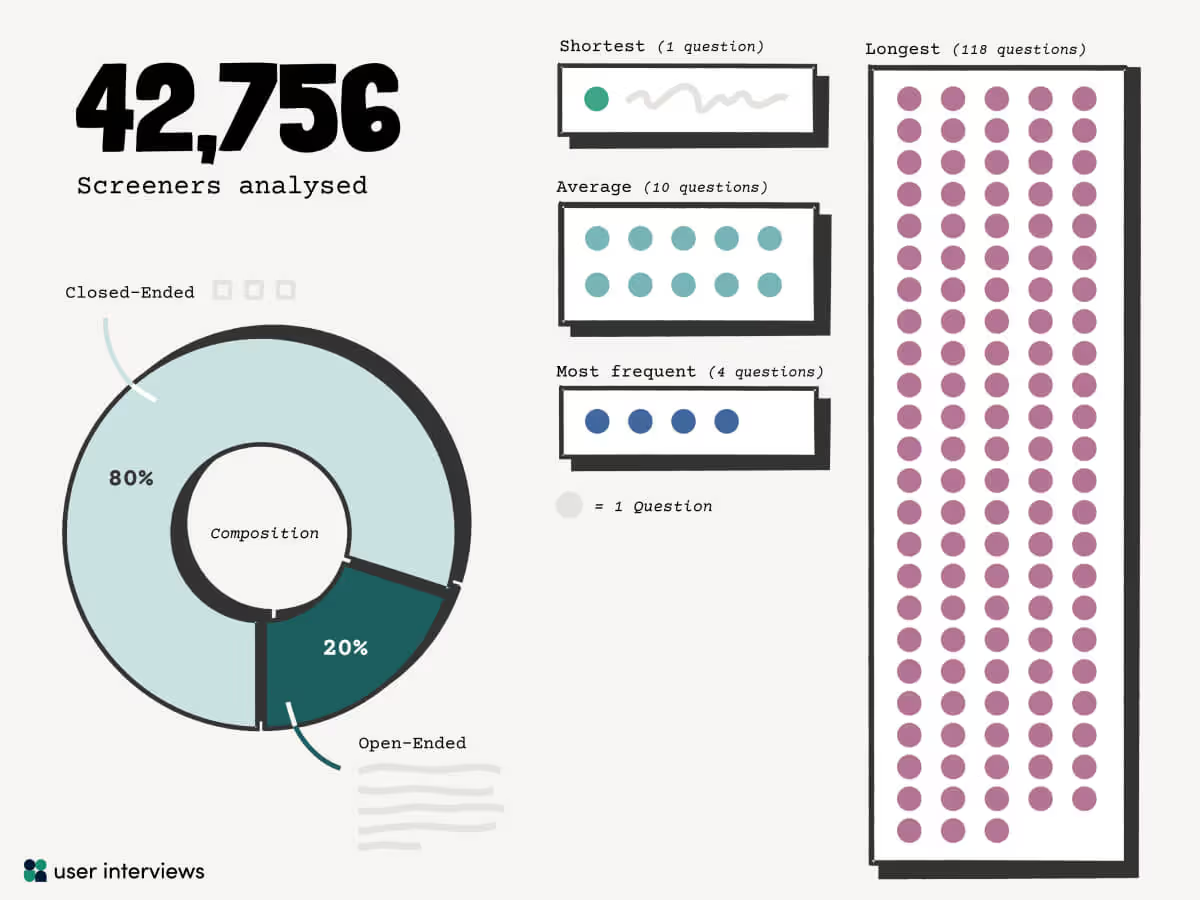
Here are some best practices we identified that can help you keep more qualified respondents engaged from start to finish:
- Limit open-ended questions: While open-ended questions can reveal deeper insights, each one you add increases the likelihood of drop-off, especially with professional (B2B) audiences. Keep them to a minimum and use them strategically, such as a single short-answer question to gauge expressiveness.
- Be concise for professional audiences: B2B participants tend to be more sensitive to survey length than B2C respondents. Aim for shorter screeners with only the most essential questions, and make every one relevant to the role, experience, or expertise you need.
- Follow the 80/20 mix: The most effective screeners in our dataset averaged 10 questions, with roughly 80% closed-ended and 20% open-ended. This balance keeps completion rates high while still giving you qualitative detail to verify fit.
It’s equally important to determine the ideal number of participants for your study. Both the research method and the expected no-show rate will impact the number of participants you need.
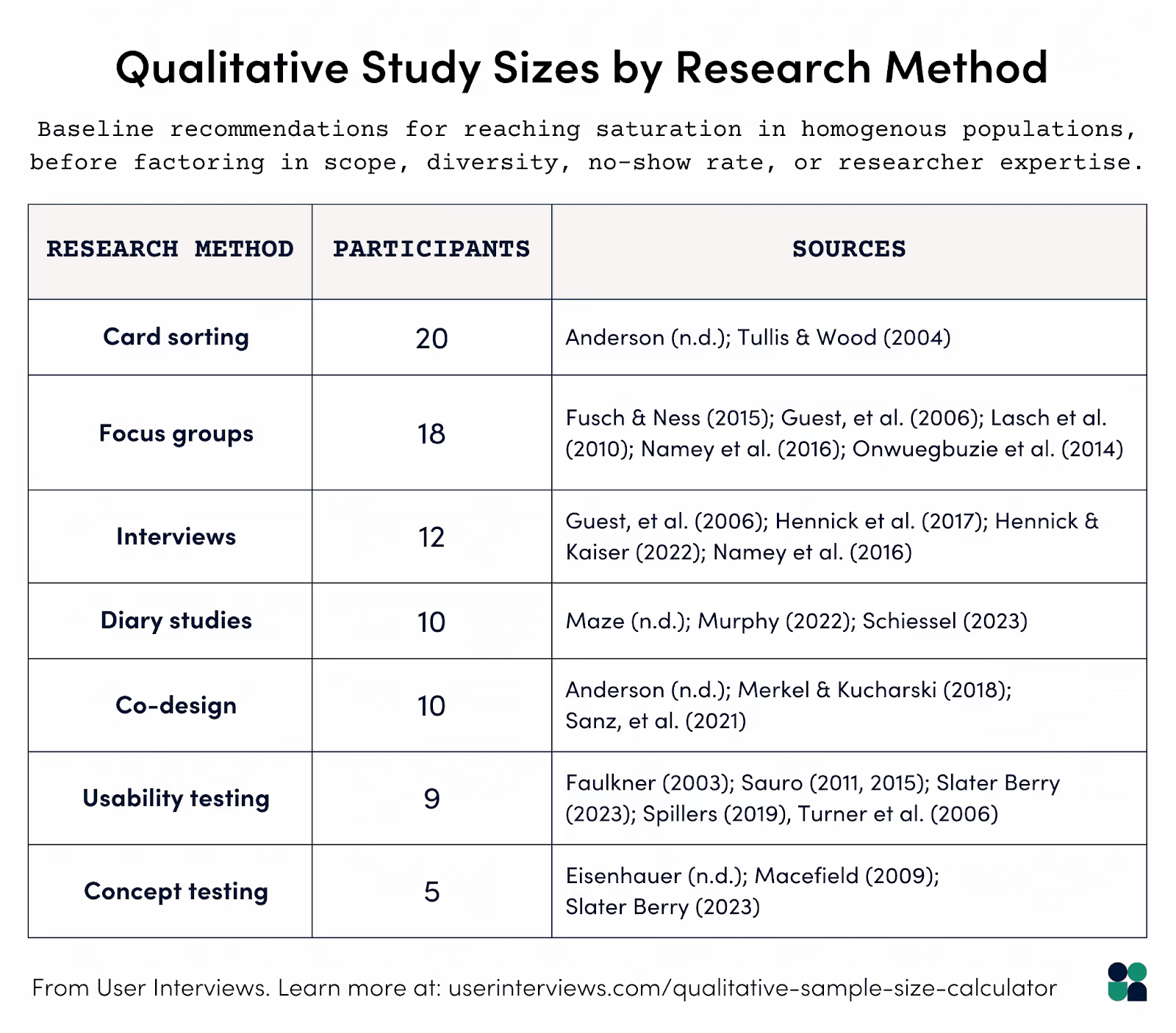
For qualitative research (such as in-depth interviews or usability tests), you may only need 5–8 participants per round to uncover the majority of usability issues. And because even the most reliable panels face no-show rates, it’s wise to over-recruit. For example, if you need 20 completed usability sessions and expect a 10% no-show rate, recruiting 22 participants gives you a buffer without overspending.
Here’s what we recommend for qualitative sample sizes:
User Interviews makes recruiting participants easier with access to a vetted panel of 6 million participants, project coordinators to help you meet participant quotas, and tools like our qualitative sample size calculator to plan the right recruitment target from the start.
Book a demo with User Interviews today to learn how our Recruit tool can match you with qualified research participants in less than 48 hours.
2. Panel building: continuously grow and refresh your participant pool
Relying on the same participants over and over can lead to panel fatigue, outdated (or repetitive) insights, and skewed feedback as the group gets too familiar with your product or research process.
That’s why your panel shouldn’t be treated as a one-and-done asset, but rather a continuous investment. The more satisfied, diverse, and up-to-date your panel is, the less time you’ll spend scrambling for participants before each study.
A well-maintained panel means:
- Faster turnaround: There’s no need to start from scratch for every project.
- Better targeting: Richer participant profiles make it easier to find the exact match for each study.
- Higher engagement: As familiarity and trust increase, response rates tend to rise over time.
- More diverse insights: Fresh participants prevent data from becoming repetitive or overly biased.
Here are some tactics you can implement to keep your panel’s quality high
- Import and centralize existing contacts so you can build on relationships you already have.
- Offer multiple ways to self-recruit, such as opt-in forms, email invites, or in-product prompts, so participants can join your panel.
- Segment your panel based on skills, demographics, behaviors, or engagement history to ensure the right fit for each project.
- Re-engage periodically with thank-you messages, updates on how their feedback was used, and invitations to relevant future studies.
Learn more about our research panel in our 2025 Panel Report.
3. Panel management: keep participant data accurate and organized
Gathering and organizing participant data takes time, and when it's done manually (or incorrectly), it causes delays and poor participant experiences. For instance, when you store contact info, consent status, and past study history across spreadsheets or email threads, it’s easy to lose track of who’s been invited, when, and why.
Good panel management means keeping all participant details centralized, accurate, and easy to search. This includes tracking study history, consent records, incentive totals, and feedback ratings. It also means segmenting participants into dynamic lists so you can quickly pull the right people for each study without starting from scratch.
Our panel management best practices focus on speed, accuracy, and compliance without sacrificing participant trust. That means:
- Keeping your panel data clean and updated to prevent targeting outdated or unengaged participants
- Using standardized labels, templates, and filters so your team works from the same playbook
- Protecting the participant experience with rules that prevent over-contacting or re-inviting the same people too often
User Interviews automates most of this process through Research Hub. You can import participants in bulk via CSV, enrich their profiles with custom fields, segment them into dynamic lists, and apply invite rules to control frequency and eligibility.
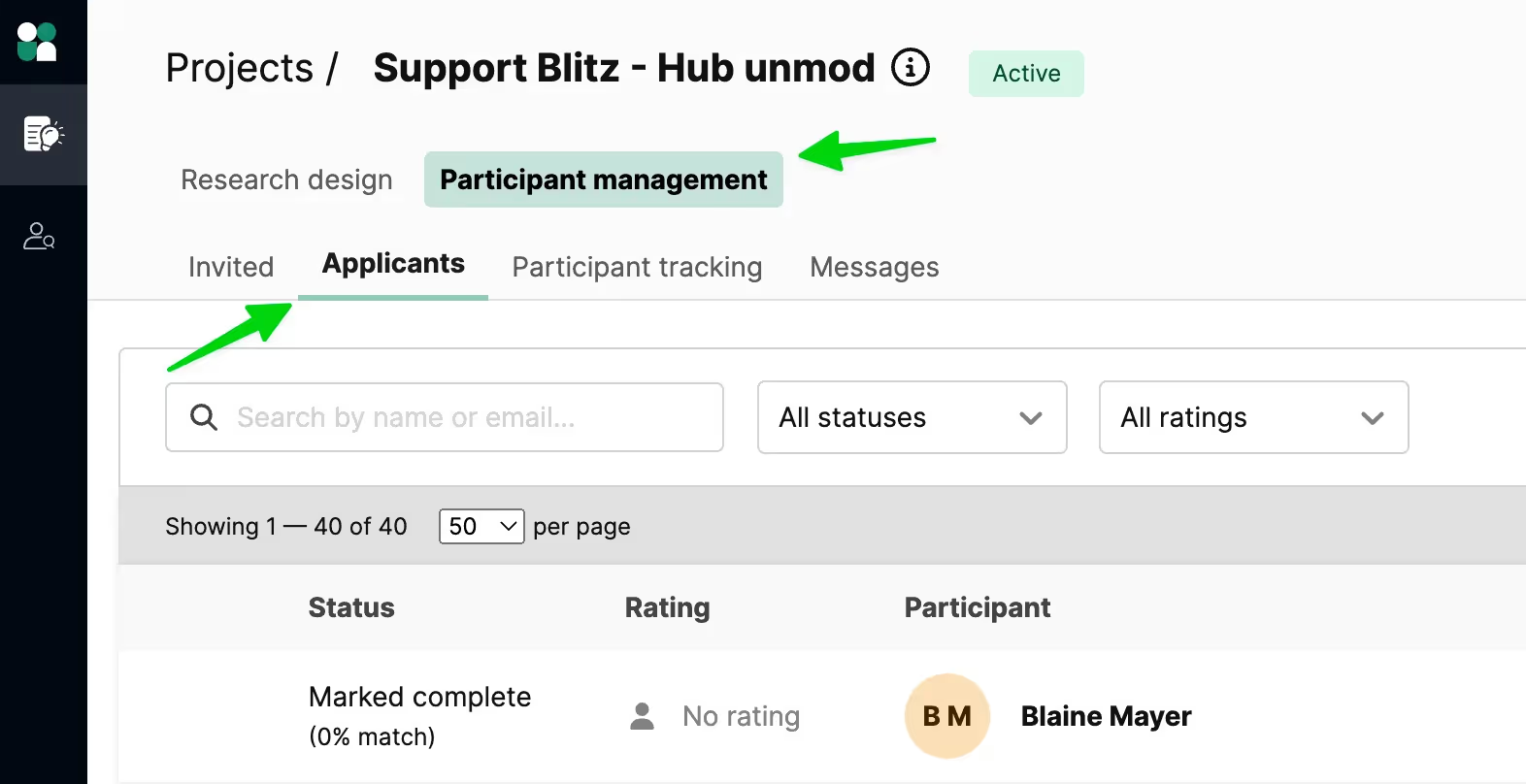
Get started with Research Hub to centralize your panel, streamline the recruitment process, and keep participant data organized for every study.
4. Engagement and incentives: communicate clearly and deliver incentives promptly
Strong participant engagement typically requires regular communication and enticing incentives that respect participants’ time and effort. When either is missing, response rates drop and the number of no-shows rises.
Begin communicating clearly the moment you invite a participant join your study. Provide all essential details upfront, including the purpose of the research, the expected time commitment, and any preparation required.
Incentives are equally important in maintaining strong engagement. The amount and type of reward should reflect the effort required.
Our research incentives report, based on data from 20,000 completed projects, showed a clear link between higher incentives and lower no-show rates.
We found that a remote study offering $160/hour achieved no-show rates as low as 1%, while in-person studies offering $200/hour saw rates as low as 0%.
On the other hand, lower incentives often correlated with higher no-show rates, particularly for consumer studies. For instance, a study offering $60/hour saw a 45% no-show rate.
Our UX research incentives cheat sheet provides recommended incentive rates based on study type:
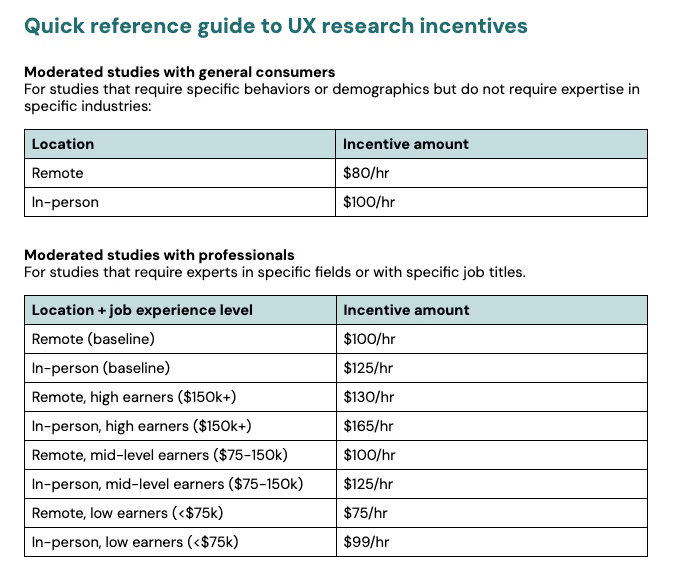
The data also revealed that the type of incentive mattered. Cash and gift cards tend to work across most audiences, but exclusive access to new products, store credits, or branded merchandise can be equally as successful.
Sending incentives within 24–48 hours of participation also results in the best feedback from participants and better long-term success. Using a platform like User Interviews allows you to set up automatic incentive distribution to ensure all your rewards are sent on time.
Want to know exactly how much to offer participants? Use our free UX Research Incentive Calculator to set fair incentives that boost response rates.
3 common approaches to participant management plus our top pick
Below, we’ll break down the most common ways teams manage participants, including manual spreadsheets, generic CRMs or survey tools, and dedicated user research CRM software. Plus, we'll highlight which option delivers the best results.
1. Spreadsheets or manual systems
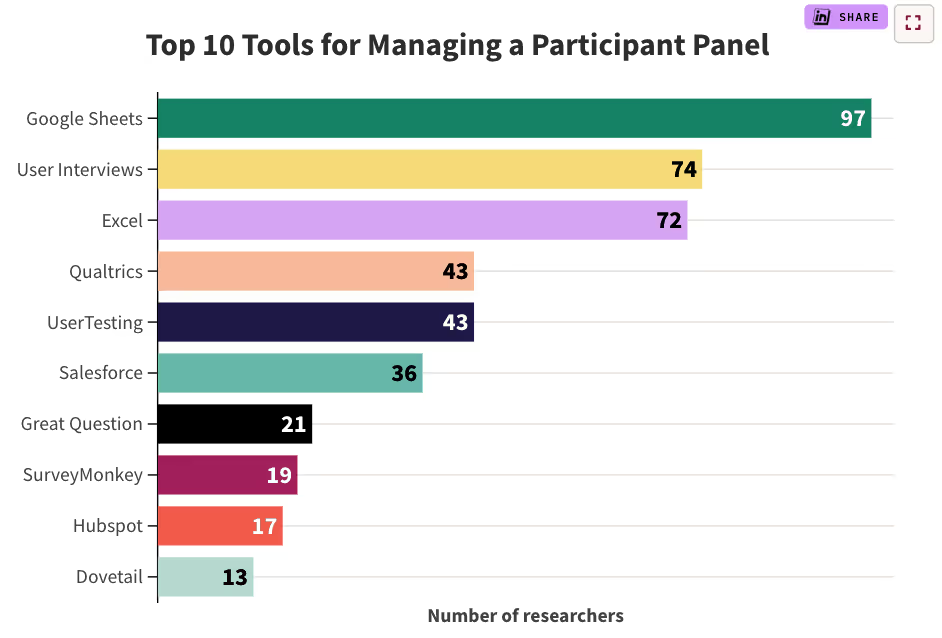
According to our 2024 State of User Research report, 48% of all respondents don’t use any software to manage their participants.
Of the 52% that do use software, manual spreadsheets were the most commonly used tool for participant management, with 28% of researchers opting for Google Sheets or Excel.
However, as research demand or project size increases, manual systems quickly become messy, error-prone, and difficult to maintain.
Common issues include:
- Lost participant history: No easy way to see past studies or track participant quality over time.
- Duplicate invites: Leading to participant frustration and reduced response rates.
- Inconsistent data entry: Making it harder to target the right participants.
- Security and compliance risks: Storing personal information in unsecured files.
That’s where purpose-built participant management platforms, like User Interviews, can help centralize data, streamline scheduling, and maintain participant quality over time.
2. A traditional CRM or survey tool
Our research found that 29.2% of research teams use a dedicated CRM or survey tool for participant management:
- 11% use Qualtrics
- 9% use Salesforce
- 5% use SurveyMonkey
- 4% use HubSpot
While relying on a traditional CRM or survey tool may seem like a convenient way to store participant contact info, they’re not designed to manage the full participant lifecycle. This often means:
- Extra administrative overhead – building custom fields, reports, and workflows just to track participant-specific data.
- Gaps in recruitment capabilities – limited or no advanced targeting filters for finding qualified participants.
- No built-in screening or scheduling – forcing teams to manage these steps through separate tools or manual processes.
- Incentive delivery challenges – no integrated payment system for participant rewards.
3. A dedicated user research CRM
A dedicated user research CRM (like User Interviews) is designed specifically for managing participants from recruitment to follow-up in one place.
This eliminates the need for workarounds, automates time-consuming tasks, and ensures participant information stays organized, secure, and easy to act on. In short, User Interviews helps you overcome the challenges that manual spreadsheets, generic CRMs, and survey tools present by handling everything, including participant sourcing, screening, scheduling, and insights.
Here's a more detailed explanation of how the participant management platform works:
Recruit from an extensive database of qualified participants
User Interviews gives researchers direct access to a proprietary panel of 6 million verified participants, with no reliance on third-party sourcing. This means every person in the database has opted in to research, completed a profile, and passed rigorous fraud detection checks.
To date, the panel has supported over one million sessions, distributed $41+ million in incentives, and maintained a fraud rate below 0.6%.
The platform’s fraud detection system evaluates more than 50 unique signals (ranging from identity verification to device fingerprinting) across the participant lifecycle. The model is retrained regularly to keep pace with new fraud patterns.
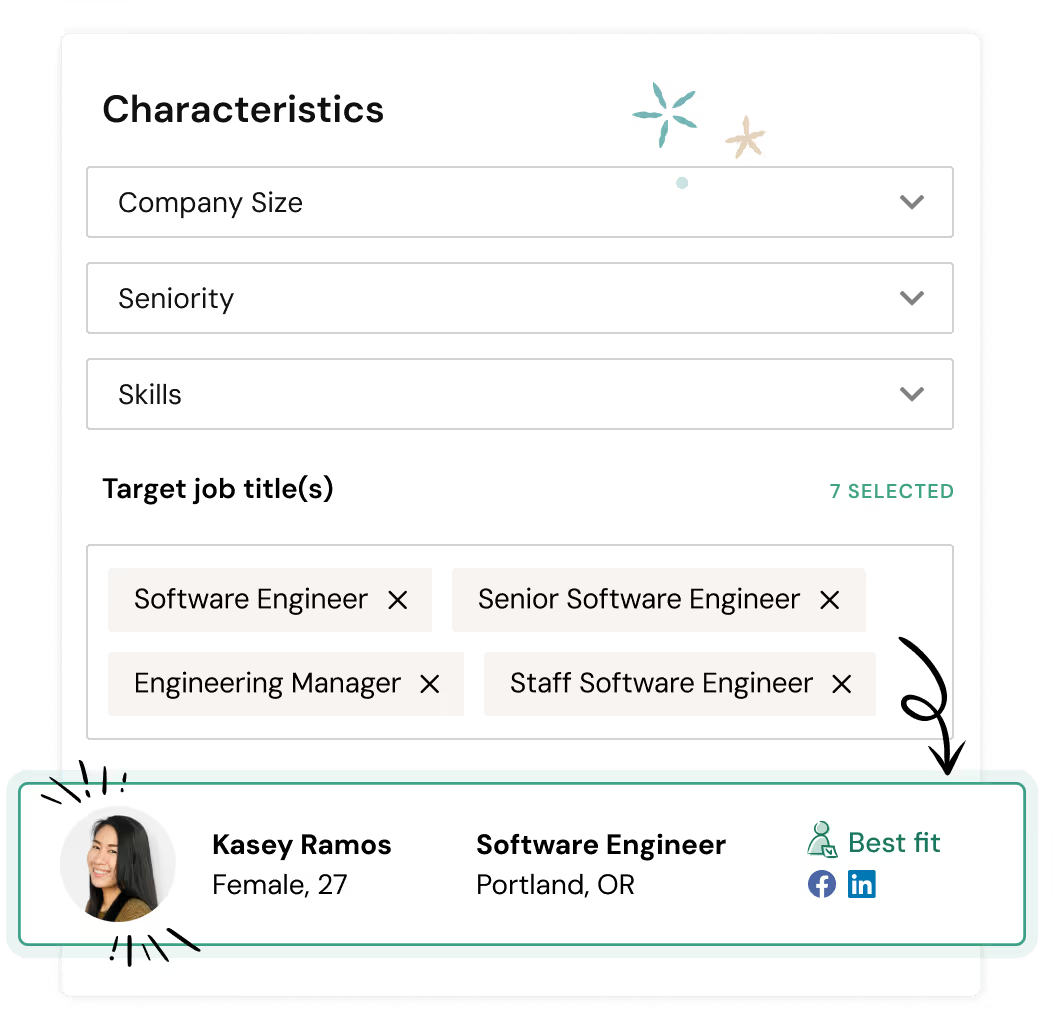
Researchers can also review a participant’s past activity, seeing ratings and notes from other projects before inviting them. This helps avoid no-shows and low-engagement respondents.
User Interviews’ Recruit tool is how you'll find qualified participants for studies.
It offers 20+ targeting filters, including:
- Demographics: age, gender, income, education, race/ethnicity, marital status, etc.
- Professional: job title, industry, company size, seniority, skills, and small business ownership.
- Products & Services: software tools used, subscription services, vehicles owned, financial platforms.
- Technical: devices, operating systems, browsers, assistive technology.
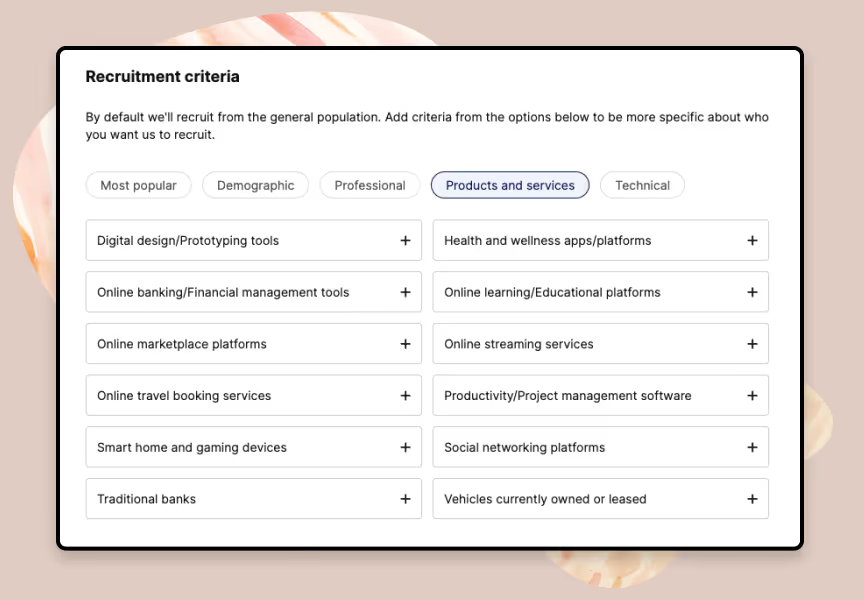
Research teams typically get matched with their first confirmed study participants in 24-48 hours.
For even more precision, you can layer in custom requirements. For example, a real estate study may require “60% first-time homebuyers, 40% repeat buyers, all actively searching within the past 3 months.” You can also adjust screeners, quotas, or incentives mid-project without starting over.
Screen participants more efficiently with customizable surveys
Ineffective screening is one of the fastest ways to derail participant management, primarily because you'll be wasting time chasing unqualified participants who meet surface-level criteria but don’t actually fit the study’s needs.
Many recruitment platforms simply hand over a list of people who match basic demographics, leaving you to discover late in the process that they lack the right experience, availability, or motivation.
With User Interviews, you can build precise, customizable screener surveys to thoroughly qualify participants before scheduling.
The drag-and-drop builder supports multiple question types, such as pick-one, pick-any, multi-select, short-answer, long-answer, video-response, and matrix grids. Plus, it allows skip logic to route participants based on their answers.
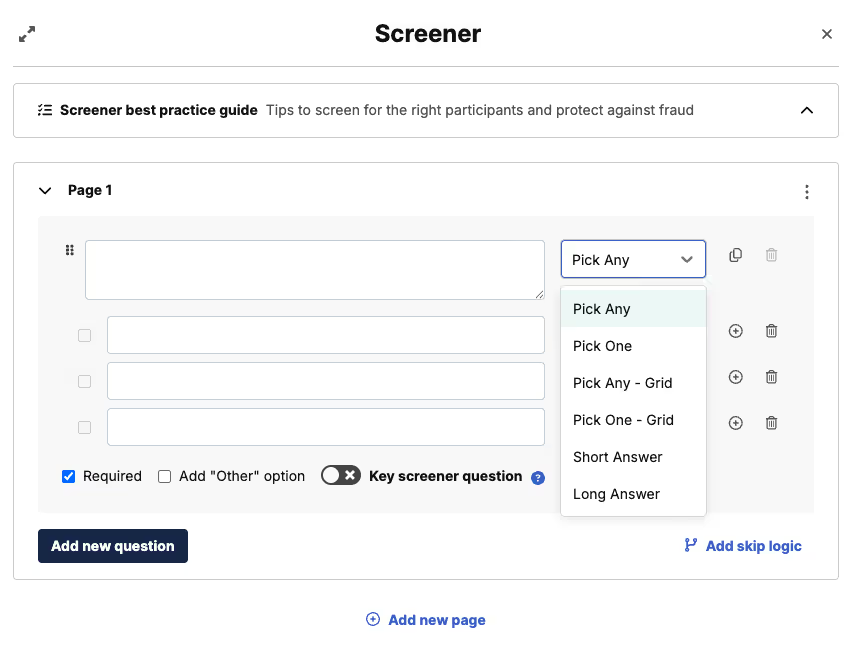
For longer lists, bulk-paste answer options instead of adding them manually. Every screener can be saved as a reusable template, eliminating the need to rebuild common surveys from scratch.
The platform also makes it easier to confirm participant fit before scheduling, with advanced screening features:
- Premium Screening: Double verification via email, phone, or video to ensure participants’ claimed qualifications match reality.
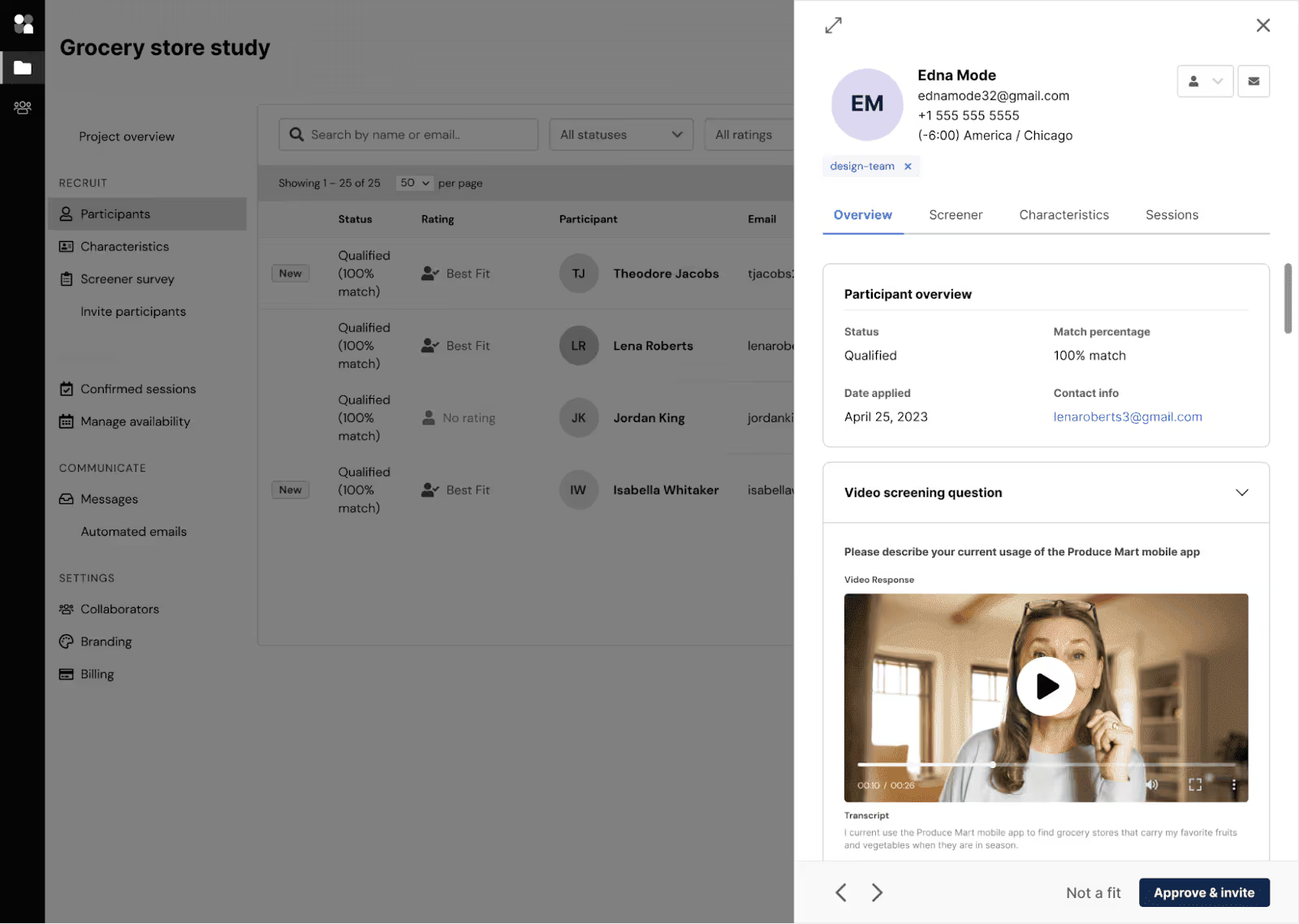
- Automatic Participant Qualification: Instantly approve participants who are a 100% match to your targeting and screener criteria, speeding up scheduling for straightforward projects.
- Video Screening: Ask participants to record a short clip answering a custom question, giving you instant insight into their expertise, communication skills, and enthusiasm.
Create and automatically distribute participant incentives
Coordinating participant incentives can quickly turn into a logistical issue for research teams managing large panels with hundreds (or thousands) of participants. This often results in delayed payments, lower participation rates, and poor participant engagement.
User Interviews makes the process simple by automating incentive setup, delivery, and tracking all within the platform.
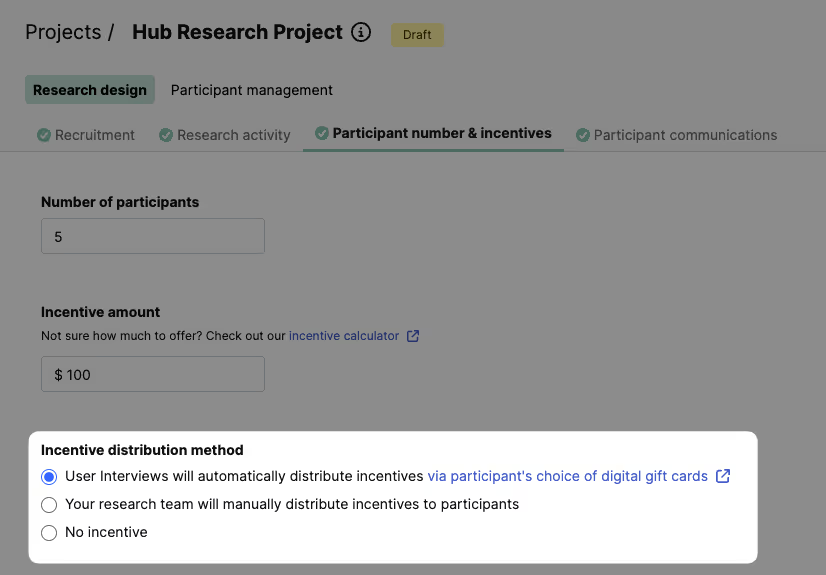
You can choose from over 1,000 incentive types (including Amazon gift cards, cash payments, and charitable donations) available in 200+ countries.
Multiple currencies are supported for Recruit projects (such as USD, EUR, AUD, CAD, GBP), and incentives can be delivered immediately once a session is complete.
Not only does our platform support the widest range of payment options, but it also allows you to adjust incentive amounts after a project has already been launched. Additionally, we offer manual incentive options if you prefer to pay participants directly using your preferred method.
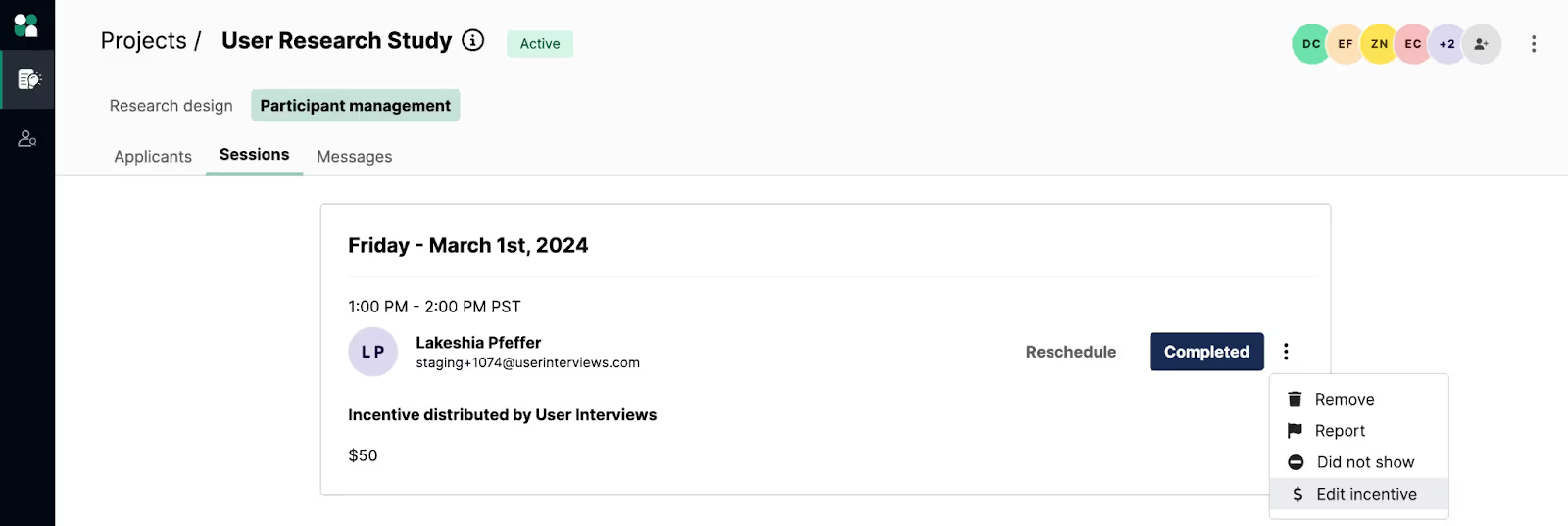
After a participant completes a session, User Interviews automatically sends customizable, branded thank-you emails to participants, helping you close the loop, maintain goodwill, and encourage future engagement. This helps you keep participants happy for future projects and protects the quality of your research panel.
Grow your panel with opt-in forms and custom invites
User Interviews’ Research Hub centralizes your panel in a customizable database, making it easy to import existing contacts via CSV and enrich profiles with custom fields (job title, signup date, or user behaviors) for precise targeting.
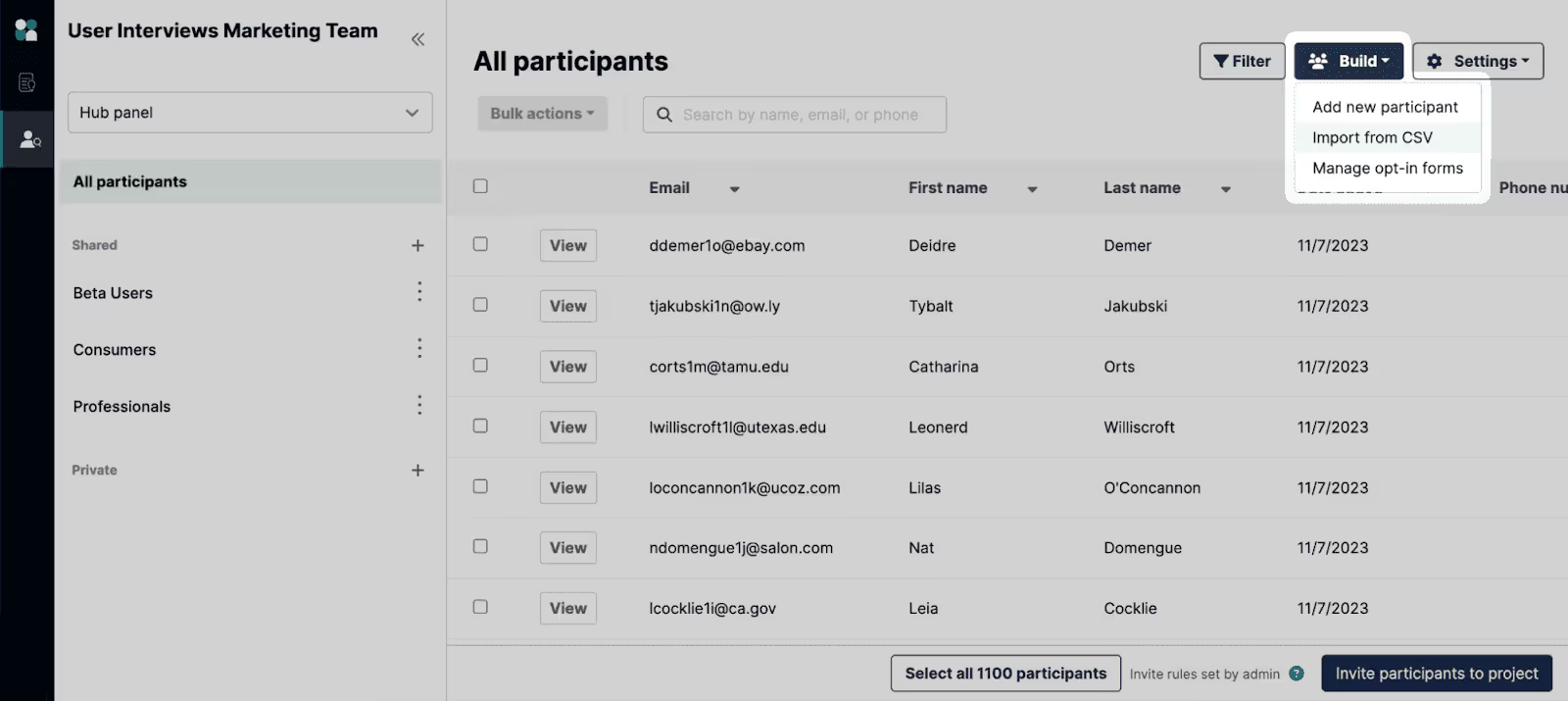
You can keep your panel healthy over time with filters to pinpoint specific profiles, labels to create dynamic participant groups, and invite rules to control who can be contacted and how often.
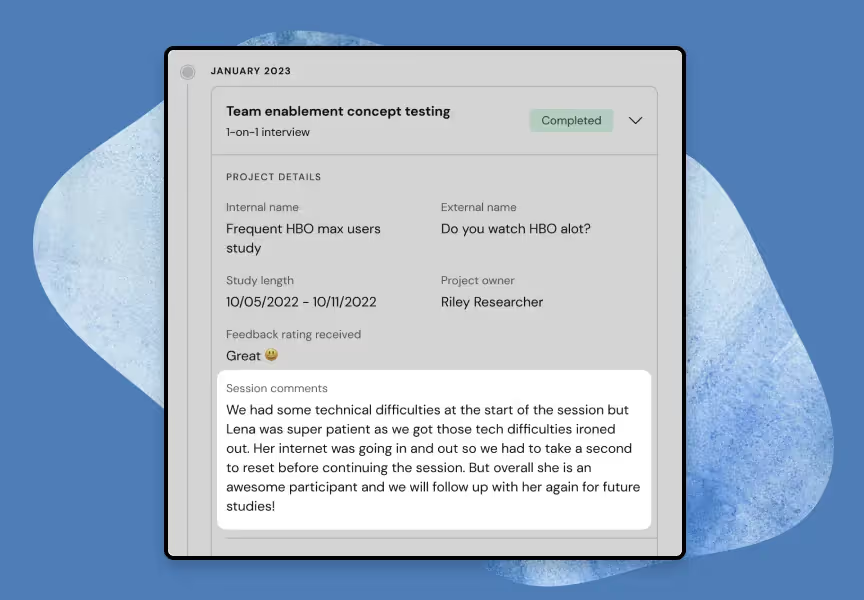
The platform also stores key information in detailed participant profiles so research teams can track past projects, engagement, and incentive history. You can also leave feedback or view session notes left by anyone on your team. This helps you quickly decide who’s a good fit for future studies.
Custom invites give you even more control over who gets contacted. Invite rules act as automated guardrails so you can control both who your team can reach out to and how often.
For example, if you want to avoid issuing 1099s to participants, you can set an invite rule to only target those who have earned less than $600 in incentives over the past year.
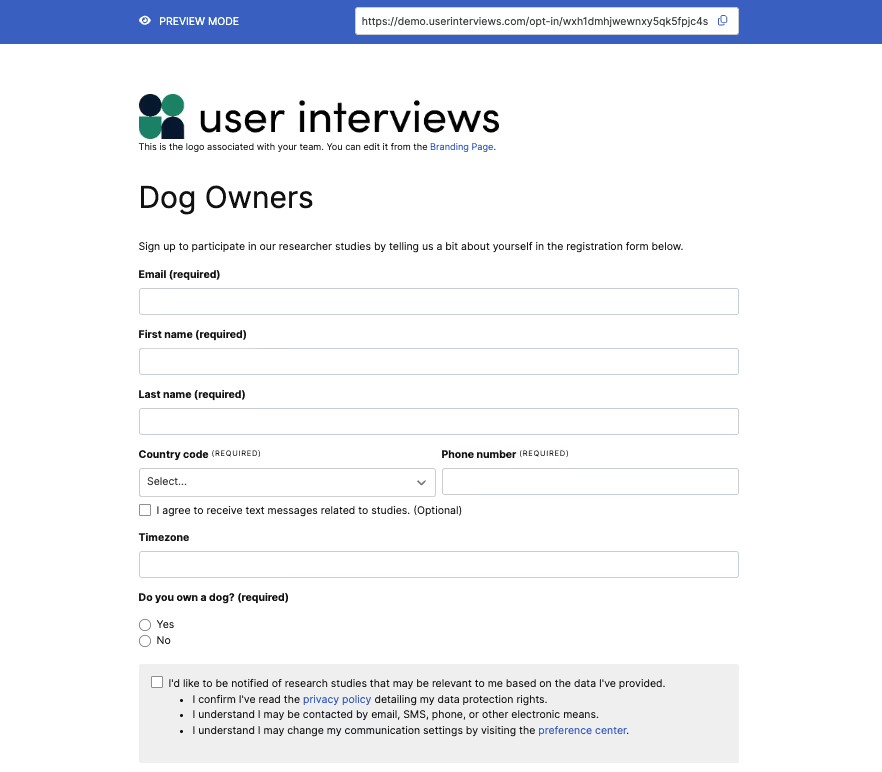
To grow your panel, Research Hub offers branded opt-in forms that can be shared via email, social media, websites, or in-app channels.
Participants self-recruit by submitting their contact details and answering your custom questions, which feed directly into your Hub database for future targeting. Built-in consent forms also ensure compliance with GDPR and other privacy regulations.
Automatically schedule study sessions with participants
Coordinating study schedules manually through email chains or spreadsheets often leads to double bookings, missed sessions, and unnecessary back-and-forth with participants.
With User Interviews, you can automate participant scheduling by integrating directly with Google Calendar, Outlook, or Zoom. Set your availability preferences, session limits, notice periods, and buffer times, and the system automatically books qualified participants into open time slots.
Your integrated calendar stays up to date in real time, so there’s no risk of overbooking or missed appointments.
You can also choose between manual scheduling (preferred only if you want complete control over when sessions are added) or automatic scheduling for a fully hands-off approach.
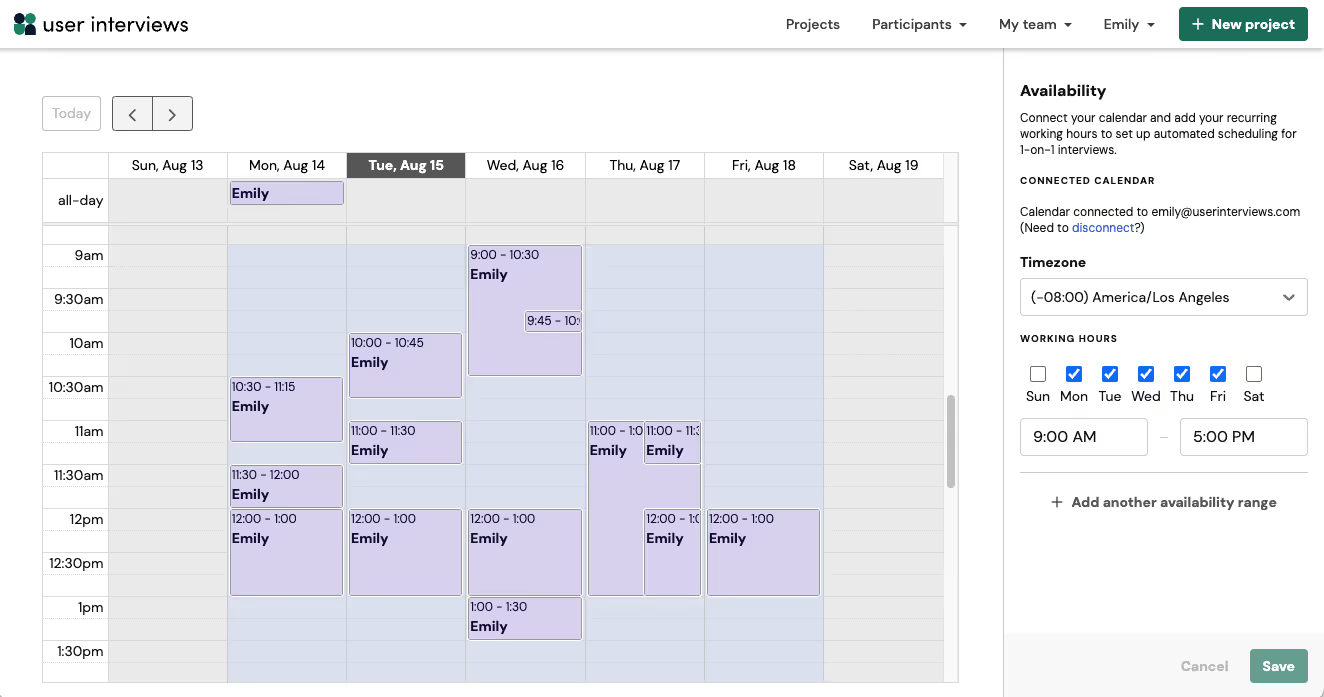
Team members can collaborate by syncing calendars and inviting colleagues as moderators or observers, with attendance roles clearly marked as Moderator, Required, Optional, or Not Included.
The platform also supports participant-led rescheduling, so if someone needs to switch time slots, they can do so without researcher intervention. You can assign specific moderators to sessions, manually adjust schedules when needed, and maintain full visibility into attendance across all sessions.
Additional scheduling rules let you define project start and end dates, start time increments, daily session caps, and allow participants to reschedule themselves without creating conflicts.
⭐️ User Interviews makes it easy to start recruiting today. To learn best practices for managing live projects in UI, check out our Academy course on Managing Live Projects —>
Streamline your participation management process with User Interviews
Managing participants well is critical to conducting high-quality research. But without a clear process and the right tools, it’s easy to get bogged down in manual work, lose track of data, or waste time chasing unqualified respondents.
User Interviews brings recruitment, panel management, engagement, and incentives into one streamlined workflow. Import your existing participants, segment them with custom criteria, and automate outreach, scheduling, and payment to keep studies moving and participants satisfied.
And when you need fresh study participants, you'll have access to a vetted panel of over 6 million individuals ready to share their insights.
Book a demo to see how User Interviews can help you better manage participants for qualitative research projects.